If you have access to OpenAI’s GPT-5.6 models, it is tempting to assume the hierarchy is simple:
Sol is best. Ultra is best. Fast is best. Therefore, use Sol + Ultra + Fast whenever possible.
That is usually the wrong way to think about it.
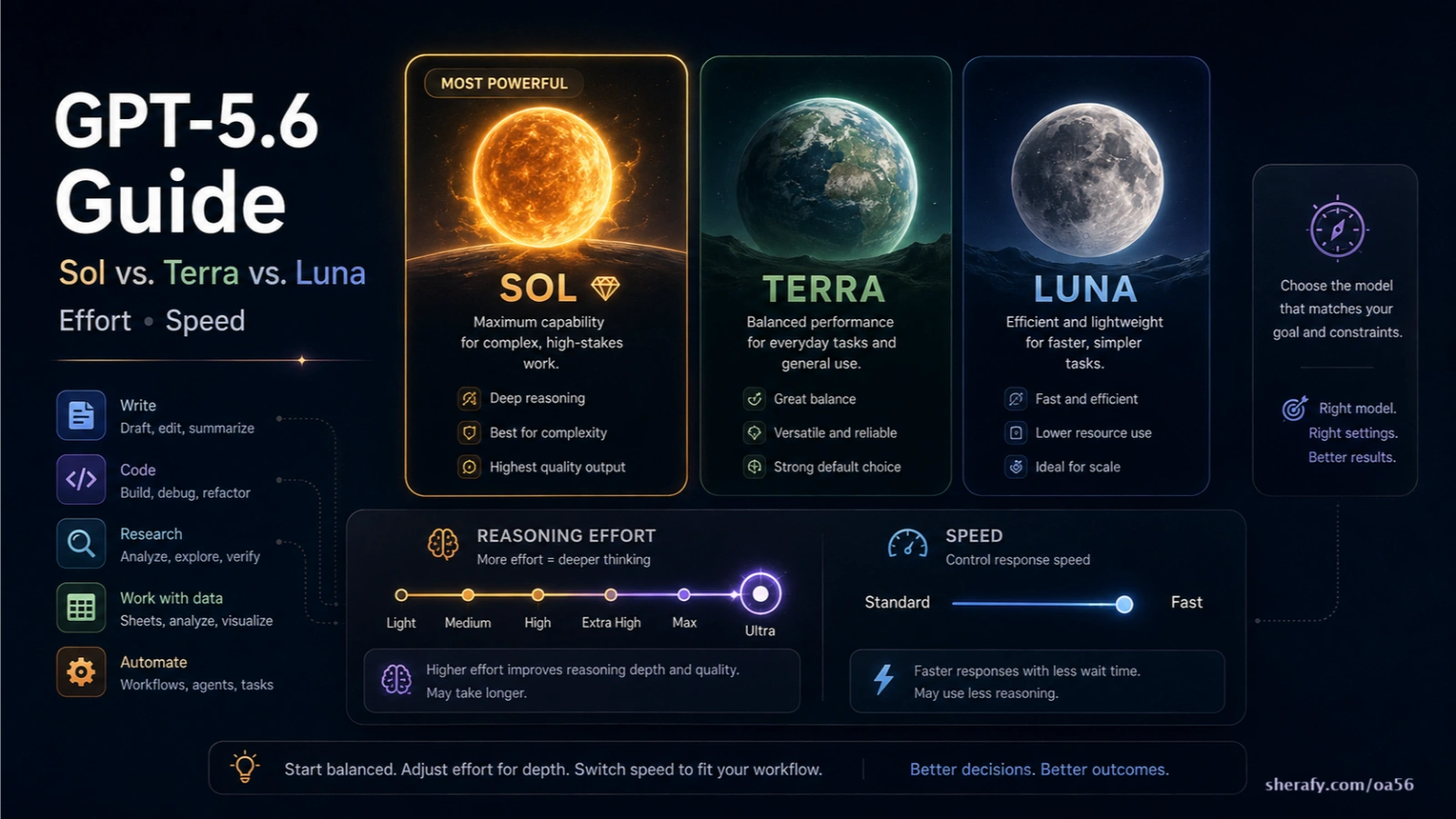
OpenAI has effectively given users three separate controls over how AI work gets done:
| Control | What you are really choosing |
|---|---|
| Model: Sol, Terra, Luna | How capable, expensive, and specialized the underlying model should be |
| Reasoning: Light → Ultra | How much computational work should be spent solving the task |
| Speed: Standard → Fast | How quickly the supported model should be served |
They are not three versions of the same “better” slider.
For most people, the practical rule is:
| If the work looks like this… | Start here |
|---|---|
| Simple, predictable, repetitive | Luna + Light or Medium |
| Normal professional work | Terra + Medium |
| Important, ambiguous, research-heavy, creative, or difficult | Sol + Medium or High |
| Difficult multi-step problem requiring careful verification | Sol + High or Extra High |
| Extremely difficult problem that one agent should think through deeply | Sol + Max |
| Large project that can be divided into independent research or execution tracks | Sol + Ultra |
| You already know the model/effort is sufficient but want the answer sooner | Add Fast |
That framework will get most users surprisingly close to the optimum.
But there are important exceptions.
And understanding those exceptions is the difference between intelligently allocating AI compute and simply throwing the most expensive configuration at everything.
The Most Important Concept: Model, Reasoning, and Speed Are Different Decisions
Imagine hiring someone to solve a problem.
Choosing Sol, Terra, or Luna is roughly analogous to deciding what kind of worker you need.
Choosing Light, Medium, High, Extra High, Max, or Ultra determines how much work you want that system to devote to the problem.
Choosing Standard or Fast determines how quickly you want that work returned.
This distinction matters because a problem can fail for completely different reasons.
If the underlying task is too difficult, you may need a stronger model.
If the model is capable enough but rushing through the logic, you may need higher reasoning.
If the model is already producing excellent results but you dislike waiting, you may need Fast.
And if the AI is missing information entirely, none of those settings necessarily fixes the problem. You may need better source material, web research, files, tools, or a better-defined prompt instead.
OpenAI’s own reasoning guidance effectively treats reasoning effort as a tuning parameter rather than a substitute for clearly specifying the goal, constraints, expected output, and definition of completion.
That leads to one of the most useful rules in this entire guide:
Do not use more reasoning to compensate for missing information, a bad prompt, or the wrong model.
GPT-5.6 Sol: When You Want the Best Judgment, Not Merely an Answer
GPT-5.6 Sol is the flagship model in the family.
OpenAI specifically positions Sol for difficult professional work including complex coding, research, computer use, cybersecurity, design, and other tasks requiring substantial reasoning and judgment.
But “strongest model” does not mean “correct model for every task.”
What Sol is particularly good at
Sol becomes increasingly valuable as a task becomes:
ambiguous, open-ended, consequential, interdisciplinary, messy, difficult to verify, dependent on judgment, or highly sensitive to the quality of the finished output.
Consider the difference between these two prompts:
Convert these 500 customer comments into positive, neutral, and negative.
and:
Analyze these 500 customer comments, identify previously unnoticed product problems, distinguish genuine product failures from onboarding confusion, determine which problems appear to be increasing, and recommend what our product team should prioritize next quarter.
Both involve the same data.
The second problem requires interpretation, uncertainty management, prioritization, and synthesis.
That is Sol territory.
Sol for research and writing
Sol is particularly useful when an article is not merely a writing assignment but an investigation.
For example:
“Rewrite this paragraph more clearly” probably does not require Sol.
“Investigate why a federal agency repeatedly fails an audit, determine which popular explanations are actually supported by evidence, reconstruct the regulatory history, identify unresolved questions, and produce a publication-ready article” is fundamentally different.
The difficult part is not generating sentences. It is deciding:
what matters,
which claims deserve confidence,
which sources contradict each other,
what is established,
what is inference,
what the reader is really asking,
and what conclusion the evidence supports.
That is precisely where stronger reasoning models become valuable.
OpenAI also reports that GPT-5.6 improved work with documents, spreadsheets, presentations, design, computer interaction, and information gathered from messy professional environments.
Sol for coding
Sol is the logical default for difficult programming tasks involving architecture, unfamiliar repositories, subtle bugs, security issues, migrations, large refactors, or situations where several constraints interact.
But using Sol for every code edit can still be wasteful.
Changing a CSS margin from 20 pixels to 24 pixels does not suddenly become a better engineering task because Sol performs it.
The benefit of Sol rises with the amount of judgment required, not simply because code is present.
GPT-5.6 Terra: Probably the Most Underrated Default
Terra is the model many professional users should probably use more often.
OpenAI describes GPT-5.6 Terra as a balanced everyday workhorse designed to provide strong reasoning and tool use at lower cost than Sol.
The useful way to think about Terra is not “weaker Sol.”
Think:
How much of my work really requires OpenAI’s flagship model?
For many users, the answer is considerably less than 100%.
Terra is extremely well matched to the enormous middle of professional AI use:
| Task | Terra fit |
|---|---|
| Writing routine emails | Excellent |
| Editing existing prose | Excellent |
| Summarizing meetings | Excellent |
| Analyzing ordinary documents | Excellent |
| Working with spreadsheets | Excellent |
| Producing reports from supplied material | Excellent |
| Routine website editing | Excellent |
| WordPress work | Excellent |
| Most HTML/CSS changes | Excellent |
| Normal JavaScript or Python work | Excellent |
| Writing documentation | Excellent |
| Converting information between formats | Excellent |
| Research with clearly defined questions | Very good |
| Complex investigative research | Sol becomes preferable |
| Large architectural coding decisions | Sol becomes preferable |
Terra therefore makes a compelling default production model.
A user working all day with AI could reasonably conduct most ordinary work with Terra and move to Sol when the problem actually demands additional judgment.
That is substantially different from always starting at maximum capability.
GPT-5.6 Luna: Not a “Bad Model” — a Specialized Efficiency Model
Luna is OpenAI’s fastest and least expensive GPT-5.6 model.
OpenAI specifically recommends Luna for clear, repeatable, well-defined and high-volume work, including extraction, classification, transformation, structured summaries, support tasks, background automation, and narrowly scoped coding.
This distinction is important.
Luna is not primarily competing with Sol over who can solve the world’s hardest problem.
Its value is that enormous amounts of real-world AI work are not particularly difficult.
Suppose a company has 50,000 invoices and needs:
vendor name,
invoice number,
date,
subtotal,
tax,
and total
extracted into structured records.
Sol may perform beautifully.
But if Luna already produces the required accuracy, using Sol may accomplish little except consuming more resources.
The same is true for:
classifying support tickets,
standardizing product descriptions,
extracting named entities,
converting text into predefined JSON,
summarizing thousands of repetitive records,
routing incoming requests,
performing predictable transformations,
or executing narrowly defined pieces of code.
The smartest model is not automatically the smartest business decision.
The API Price Difference Makes This Much More Concrete
For API users, OpenAI’s current published prices make the distinction especially obvious.
| GPT-5.6 model | Input per 1M tokens | Cached input | Output per 1M tokens |
|---|---|---|---|
| Sol | $5.00 | $0.50 | $30.00 |
| Terra | $2.00 | $0.20 | $12.00 |
| Luna | $0.20 | $0.02 | $1.20 |
These are OpenAI’s published prices as of August 10, 2026.
That means Terra currently costs 40% as much as Sol per ordinary input or output token, while Luna costs only 4% as much.
At small personal volumes, that distinction may not matter much.
At millions or billions of tokens, it becomes enormous.
This is why developers building production AI systems should evaluate the cheapest model that reliably meets their quality requirement, rather than assuming the flagship belongs in every pipeline.
Now the Harder Part: What Does Reasoning Effort Actually Change?
The next decision is reasoning effort.
OpenAI’s interfaces currently expose variations of these levels depending on product surface:
| Work/Codex-style label | General meaning |
|---|---|
| Light | Fast, limited reasoning for simple work |
| Medium | Balanced reasoning; good default |
| High | Greater analysis for difficult multi-step tasks |
| Extra High | Deep reasoning for particularly demanding work |
| Max | Very deep work on one difficult task |
| Ultra | Maximum reasoning plus the ability to delegate work across subagents where appropriate |
The API uses somewhat different terminology, including values such as none, minimal, low, medium, high, xhigh, and max, depending on the model. The labels should therefore not be treated as perfectly interchangeable between products.
What matters is the underlying principle:
higher reasoning levels allow the model to devote more computational work to solving and checking the problem.
OpenAI explicitly recommends using the lowest reasoning effort that produces the quality you need.
That advice is worth taking seriously.
Light: For Tasks Where the Path to the Answer Is Obvious
Use Light when the model does not have much to figure out.
Good examples include:
| Task | Good starting point |
|---|---|
| Rewrite this sentence professionally | Terra Light |
| Extract the phone numbers from this text | Luna Light |
| Convert this data into JSON | Luna Light |
| Fix this typo | Luna or Terra Light |
| Explain what this short error message means | Terra Light |
| Rename these variables consistently | Terra Light |
| Summarize this straightforward email thread | Terra Light |
| Categorize these transactions using these predefined categories | Luna Light |
Increasing reasoning effort here may produce almost no visible improvement.
There simply isn’t enough reasoning to do.
Medium: The Default Most People Should Use Most of the Time
Medium is arguably the most important setting.
OpenAI describes medium reasoning as the balance between speed, quality, reliability, planning, and judgment and recommends it across many normal workloads.
Medium is appropriate when the AI needs to think, but the problem is not extraordinarily difficult.
That includes a huge amount of everyday work.
| Task | Sensible configuration |
|---|---|
| Write an article from good source material | Terra Medium |
| Improve an article’s structure and SEO | Terra Medium |
| Analyze a spreadsheet | Terra or Sol Medium |
| Prepare a client proposal | Terra Medium |
| Build a normal webpage | Terra Medium |
| Fix a moderately complicated programming bug | Terra Medium |
| Review a contract for specified clauses | Terra Medium |
| Research a clearly defined topic | Sol Medium |
| Create a presentation from supplied information | Terra or Sol Medium |
| Analyze a business problem | Terra or Sol Medium |
OpenAI itself currently uses GPT-5.6 Sol with medium reasoning as its “Power” default in Work, which is a useful signal about how broadly capable that combination is.
For someone who does not want to think about settings constantly, Sol Medium is an excellent quality-first universal default.
For someone more conscious of usage and efficiency, Terra Medium is an excellent everyday default.
High: When the Model Needs to Connect Several Things Correctly
High becomes useful when mistakes are increasingly likely to come from reasoning rather than information retrieval.
Examples include:
a difficult debugging problem,
evaluating several competing explanations,
planning a complicated project,
analyzing a large financial model,
reasoning through conflicting evidence,
understanding interactions across several software components,
or synthesizing material from numerous sources.
OpenAI recommends high reasoning for difficult reasoning, complex debugging, deeper planning, and other high-value tasks where quality matters more than latency.
A good practical test is this:
Would a capable human need to stop, think, revisit earlier assumptions, and check several interacting pieces before confidently answering?
If yes, High may be justified.
Extra High: When Being Superficially Right Is Not Good Enough
Extra High—or xhigh in some OpenAI interfaces—is appropriate when the model needs to reason through a genuinely difficult problem and additional checking is worth the added latency and compute.
OpenAI associates this level with demanding coding, deeper research, security and code review, enterprise knowledge work, and long-running agentic tasks, while also recommending that users confirm through evaluation that the added compute actually improves results.
For research, this might mean moving from:
“Explain the arguments on both sides.”
to:
“Reconstruct the evidence, compare primary sources, identify contradictions, distinguish established facts from inference, test several competing explanations, and determine which is best supported.”
For software engineering, it might mean moving from:
“Fix this function.”
to:
“Determine why this distributed system intermittently corrupts state under concurrency, trace the failure through the repository, evaluate several fixes, implement the safest one, and verify that the change does not break adjacent behavior.”
Those are fundamentally different workloads.
Max: Extremely Deep Reasoning on One Problem
Max is worth distinguishing from Ultra.
OpenAI describes Max as giving the agent additional time to work on the hardest problems, prioritizing depth over speed and usage.
The key phrase is one problem.
Think of Max as:
“Keep working this through more deeply.”
It can make sense for:
a very difficult mathematical or scientific problem,
a nasty architectural bug,
a complicated code review,
a difficult forensic analysis,
an important strategic decision,
or another problem where deep sequential reasoning matters.
But Max is not automatically appropriate merely because a project is large.
If the project naturally consists of several independent tracks, Ultra may be the more meaningful change.
Ultra Is Different: It Is Not Merely “More Max”
This is one of the most misunderstood parts of GPT-5.6.
OpenAI describes Ultra as allowing ChatGPT to use maximum reasoning while also proactively delegating suitable parts of a task to subagents.
That changes the topology of the work.
Instead of one agent doing:
A → B → C → D
the system may be able to do something more like:
A → research track 1 A → research track 2 A → analysis track 3 A → verification track 4
and then bring those results back together.
This can be enormously useful.
It can also be complete overkill.
The correct question for Ultra
Do not ask:
Is this task really hard?
Ask:
Can meaningful parts of this task be investigated or executed independently and then recombined?
If yes, Ultra becomes interesting.
A large investigative research project is a good example.
One agent could reconstruct the timeline.
Another could analyze financial records.
Another could review legal filings.
Another could test competing explanations.
The primary agent can then synthesize the work.
A single short but difficult logic puzzle, by contrast, may benefit more from Max than Ultra because there may be little useful parallel work to delegate.
OpenAI itself cautions that most tasks do not require Max or Ultra.
Standard vs. Fast: Fast Does Not Mean Smarter
Speed is the third axis.
OpenAI describes Fast as increasing processing speed without changing the selected model into a different intelligence tier.
That means:
Sol High Standard and Sol High Fast are fundamentally the same model-and-reasoning decision.
Fast is about latency.
In ChatGPT Work and Codex, OpenAI currently says Fast can increase supported model speed by approximately 1.5×, while GPT-5.6 and GPT-5.5 work consumes credits at 2.5× the Standard rate.
For the API, OpenAI’s Fast/Priority processing can provide up to roughly 2.5× faster processing, with premium pricing; OpenAI currently documents GPT-5.6 Priority/Fast service at twice the Standard API token rate.
So Fast makes the most sense when your time is more valuable than the additional compute cost.
When Fast Is Worth It
Fast is especially useful for interactive work.
Suppose you are actively programming with AI and making dozens of short iterations:
change this,
run it,
inspect the error,
modify that,
test again,
change the UI,
test again.
The difference between repeatedly waiting and getting responses sooner compounds throughout the session.
Fast may therefore provide significant practical value.
The same can apply when:
you are pair-programming,
working interactively on a document,
rapidly iterating on a website,
using an AI assistant in a customer-facing product,
or waiting on a result that blocks your next action.
Fast is far less compelling for work where you are not waiting.
If you submit a large overnight analysis, walk away, and read it tomorrow morning, paying extra to have it finish sooner may accomplish nothing.
OpenAI similarly cautions against using its premium fast processing for large batch or ETL-style API workloads where latency is not the objective.
The Practical GPT-5.6 Configuration Matrix
The following recommendations are a practical synthesis rather than an official OpenAI prescription. They combine OpenAI’s documented model characteristics with the actual shape of common user workloads.
| Real-world task | Recommended starting point | Why |
|---|---|---|
| Correct grammar | Terra Light | Little reasoning required |
| Rewrite an email | Terra Light | Straightforward transformation |
| Rewrite an important executive message | Terra Medium | More judgment over tone |
| Summarize meeting notes | Terra Light/Medium | Routine professional work |
| Summarize thousands of similar records | Luna Light | Predictable high-volume transformation |
| Classify support tickets | Luna Light | One of Luna’s ideal workloads |
| Extract fields from invoices | Luna Light | Structured repeatable extraction |
| Write ordinary blog copy | Terra Medium | Strong general-purpose writing |
| Write a deeply researched investigative article | Sol High | Research, synthesis, source judgment |
| Investigate contradictory evidence | Sol Extra High | Requires deeper verification |
| Massive investigation with independent research tracks | Sol Ultra | Naturally parallelizable |
| Edit Word documents | Terra Medium | Routine knowledge work |
| Produce a high-stakes polished report | Sol Medium/High | Greater judgment and finish |
| Make a normal spreadsheet | Terra Medium | Everyday production task |
| Build or audit a complex financial model | Sol High | Logic interactions matter |
| Write HTML/CSS | Terra Light/Medium | Usually well scoped |
| Make routine WordPress changes | Terra Medium | Everyday technical work |
| Diagnose a weird site-wide bug | Sol High | Ambiguity and cross-system reasoning |
| Fix one obvious programming error | Terra Light/Medium | Sol is usually unnecessary |
| Implement a normal application feature | Terra Medium/High | Strong coding without maximum compute |
| Debug a complicated repository | Sol High | Larger search and reasoning space |
| Perform a difficult security review | Sol Extra High | High cost of missed interactions |
| Plan a major software architecture | Sol High/Extra High | Long-range tradeoffs |
| Solve an exceptionally difficult indivisible engineering problem | Sol Max | Deep single-agent reasoning |
| Review an entire repository from several perspectives | Sol Ultra | Security, architecture, tests and performance can parallelize |
| Brainstorm names | Terra Medium | Judgment matters more than brute reasoning |
| Generate 100,000 simple descriptions through API | Luna Light/Low | Scale and cost dominate |
| Customer-service routing | Luna Light | Clear bounded classification |
| Analyze an unusual strategic problem | Sol High | Ambiguity and judgment |
| Conduct ordinary business research | Terra Medium or Sol Medium | Depends on ambiguity |
| Make a consequential evidence-weighted recommendation | Sol High/Extra High | Verification matters |
What Should a Noncoder Use?
A person does not need to write code to benefit from the model hierarchy.
For ordinary desktop knowledge work, the difference can be summarized this way:
Luna is the factory worker.
Give it a clearly defined repetitive job and it can perform that job efficiently at scale.
Terra is the capable generalist.
It can write, organize, analyze documents, handle spreadsheets, manipulate information, make ordinary decisions, use tools, and perform routine technical work.
Sol is the senior problem-solver.
Use it when the question itself is difficult, the evidence is messy, the answer is important, or the finished product requires unusually strong judgment.
That mental model is much more useful than thinking:
Luna = dumb Terra = medium Sol = smart
All three are GPT-5.6 models.
Their optimal jobs are different.
What Should Someone Who Uses AI for Writing and Research Use?
For a person using AI heavily for articles, reports, research, websites, documents, and occasional coding, a productive workflow might look like this:
| Stage | Configuration |
|---|---|
| Simple formatting and transformations | Luna/Terra Light |
| Routine editing | Terra Medium |
| General drafting | Terra Medium |
| Important article planning | Sol Medium |
| Deep research | Sol High |
| Conflicting or difficult evidentiary analysis | Sol Extra High |
| Very large research project with independent questions | Sol Ultra |
| Routine site changes | Terra Medium |
| Difficult site debugging | Sol High |
| Rapid interactive editing | Add Fast when useful |
This matters because writing quality and research quality are not the same problem.
A strong model can produce beautiful prose while reasoning from weak evidence.
Conversely, an extremely expensive research configuration is unnecessary if the task is simply polishing a paragraph whose underlying facts have already been established.
What Should a Professional Developer Use?
Developers should resist two opposite mistakes.
One is using Luna everywhere because it is cheap.
The other is using Sol Ultra everywhere because it is powerful.
Modern software development contains tasks spanning the entire difficulty range.
A predictable refactor and a distributed concurrency bug are both “coding,” but they bear almost no resemblance as reasoning problems.
Terra is therefore likely to be extremely valuable for day-to-day coding.
Sol becomes increasingly attractive for architecture, debugging, unfamiliar codebases, security, complex refactors, long-horizon agentic work, or any situation where a small conceptual mistake may propagate widely.
Ultra becomes particularly interesting for repository-scale work because different subagents can potentially examine distinct areas or concerns in parallel. OpenAI specifically documents subagent workflows and suggests stronger models for ambiguous, demanding, multi-step work while using Terra or Luna for narrower supporting tasks when appropriate.
Do Not Solve the Wrong Problem With More Compute
This may be the single most important practical section of the guide.
Suppose the model gives you a poor answer.
Before moving the reasoning slider upward, diagnose why it failed.
| Failure | What usually helps |
|---|---|
| It didn’t know something current | Search/web access |
| It lacked your private information | Give it the relevant files/data |
| It misunderstood what you wanted | Improve the instructions |
| It omitted important requirements | Explicitly state completion criteria |
| It reasoned incorrectly | Raise reasoning effort |
| The task is beyond the model’s comfortable capability | Move Terra → Sol |
| It failed to examine enough independent angles | Consider Ultra |
| The answer is good but slow | Use Fast |
| The result is already correct | Stop spending more compute |
A model cannot reason its way into possessing evidence that was never supplied.
Nor will Ultra necessarily rescue a vague assignment.
OpenAI’s own GPT-5.6 prompting guidance emphasizes specifying the goal, constraints, output contract, and verification requirements for complex tasks rather than relying solely on additional reasoning effort.
When Are You Wasting Compute?
You are probably wasting compute when the answer would be materially identical at a cheaper setting.
If Luna Light correctly extracts a date, there is no prize for extracting the same date with Sol Ultra.
If Terra Medium produces exactly the report you need, the theoretical superiority of Sol Extra High has no practical value.
The correct optimization target is therefore not:
What is the strongest possible configuration?
It is:
What is the least expensive configuration that reliably produces the quality this task requires?
But there is an important counterargument.
For a one-off, high-value task, minimizing compute may itself be irrational.
If you are making a major business decision, debugging a failure that could cost millions, publishing an investigation that could damage someone’s reputation if wrong, or performing another consequential task, the incremental compute cost may be trivial relative to the cost of a bad result.
Efficiency should scale with the stakes.
A Better Escalation Strategy
For ordinary work, users will usually get better results by escalating systematically rather than immediately choosing the maximum setting.
| What happened? | Next move |
|---|---|
| Terra Medium nailed it | Stop |
| Terra Medium is close but missed some reasoning | Terra High |
| The problem feels fundamentally difficult or ambiguous | Sol Medium/High |
| Sol High misses subtle interactions | Sol Extra High |
| A single extremely hard problem needs deeper thought | Sol Max |
| A major project contains parallelizable workstreams | Sol Ultra |
| Quality is excellent but waiting is frustrating | Add Fast |
Notice that switching to Sol and raising reasoning effort are not the same intervention.
Sometimes Terra High is sufficient.
Sometimes Sol Medium is better because the underlying model’s stronger judgment matters more than simply allowing Terra to think longer.
There is no universal formula, so repeated workloads should be evaluated empirically.
That is also consistent with OpenAI’s API guidance: use representative evaluations to determine whether increased reasoning produces enough improvement to justify its added latency and cost.
Should You Just Leave Everything on Sol Medium?
For many individual users, that is actually a reasonable strategy.
OpenAI currently treats Sol + Medium as the default “Power” configuration in Work.
It gives you a strong model without routinely invoking the most computationally intensive reasoning levels.
The downside is efficiency.
A large amount of ordinary work does not require Sol.
Someone processing large volumes, working under organizational usage limits, paying API costs, or running AI continuously throughout the day should probably become comfortable moving between Luna, Terra, and Sol.
For a casual individual user whose priority is simply “give me a good result without making me think about this,” Sol Medium is harder to criticize.
Should You Just Use Terra Medium for Everything?
Terra Medium may be the better universal default for efficiency-conscious professional users.
It covers an enormous range of writing, document, spreadsheet, web, programming, analysis, and tool-use tasks.
Move to Sol when the problem becomes genuinely hard rather than when it merely sounds important.
This is particularly valuable in organizational environments because model selection becomes part of resource allocation.
A thousand trivial tasks sent to a flagship model can consume far more capacity without generating meaningfully better work.
When Should Luna Be Your Default?
Luna should be seriously considered whenever you can describe the desired result with high precision before the model starts.
The more your instruction resembles:
Take input X and transform it into output Y according to these rules,
the more attractive Luna becomes.
The more your instruction resembles:
I don’t fully understand this situation; investigate it, tell me what matters, identify what I may be overlooking, and determine what we should do,
the more attractive Sol becomes.
That distinction captures much of the GPT-5.6 family surprisingly well.
What About Context Windows?
Another potential source of confusion is that the same model name does not necessarily mean every OpenAI product exposes it with identical limits.
OpenAI’s API documentation currently lists 1.05 million tokens of context and up to 128,000 output tokens for Sol, Terra, and Luna.
ChatGPT products can expose different practical context limits depending on plan and interface.
So a developer looking at the API documentation should not automatically assume their ChatGPT conversation behaves identically.
The surface matters as well as the model.
ChatGPT, Work, Codex, and the API Should Not Be Confused
OpenAI increasingly has several different interfaces built around the same broader model family.
ChatGPT is oriented toward conversational interaction.
ChatGPT Work is designed for longer, multi-step work producing finished artifacts such as research, documents, spreadsheets, presentations, reports, and sites.
Codex is oriented toward software development and repository work.
The available model and reasoning controls therefore differ.
Standard ChatGPT may present a simplified set of choices such as Medium, High, Extra High, or Pro depending on plan and rollout.
Work and Codex expose more explicit model, intelligence, and speed controls.
The API exposes still more granular configuration through parameters.
This means someone reading “use Luna Light” should not panic if their ordinary ChatGPT model picker does not literally contain those two controls.
The recommendation describes the workload profile, while exact controls depend on the OpenAI product being used.
One More Complication: GPT-5.6 Sol Can Differ Between ChatGPT and Work/Codex
OpenAI updated GPT-5.6 Sol in ChatGPT on August 6, 2026, while explicitly noting that the Work and Codex version was not changing with that release.
That means two users can legitimately report somewhat different behavior from “GPT-5.6 Sol” if they are using different OpenAI surfaces.
This is worth remembering when comparing benchmarks, screenshots, reviews, or personal experiences.
Model family names are important.
But the product, version, tool environment, reasoning setting, context, and prompt can all influence the actual experience.
So What Is the Best GPT-5.6 Model?
There is no universally best configuration.
There is a best configuration for a given job.
If forced to reduce the entire guide to three sentences:
Use Luna when the job is predictable. Use Terra when the job is normal. Use Sol when the problem itself is difficult.
Then:
Use Medium until you have a reason not to. Move down for trivial work and upward as reasoning, uncertainty, verification, and consequences increase.
And:
Use Max when one agent needs exceptional depth; use Ultra when a large problem benefits from parallel agents; use Fast when latency itself is costing you something.
That is a much more useful framework than simply selecting the highest number available.
Frequently Asked Questions
Is GPT-5.6 Sol always better than Terra?
Sol is OpenAI’s higher-capability flagship model, but that does not mean using it always produces enough practical improvement to justify the additional compute or cost. Terra is explicitly designed as the balanced everyday model and is better suited economically to many routine professional workloads.
Is GPT-5.6 Luna only for simple chat?
No. Luna is specifically useful for high-volume structured work including extraction, classification, transformations, summaries, routing, support workflows, background automation, and focused coding.
Does higher reasoning make the model more knowledgeable?
Not necessarily.
Reasoning effort changes how much computational work the model can devote to solving a task. It does not magically provide information that is absent from the model’s context, tools, or sources.
Is Extra High better than High?
It allows deeper reasoning, but “better” depends on whether the additional computation improves the task. For ordinary work, the difference may not justify the added time or usage. OpenAI recommends evaluating harder reasoning levels against representative tasks rather than assuming maximum effort is always optimal.
Is Ultra just the highest reasoning setting?
Not exactly.
Ultra is especially significant because it can allow ChatGPT to delegate suitable pieces of work to subagents rather than merely spending more time reasoning sequentially.
What is the difference between Max and Ultra?
Max emphasizes deep reasoning on an individual task. Ultra can add parallel subagent execution when the problem can sensibly be decomposed.
Does Fast make GPT-5.6 less intelligent?
OpenAI describes Fast as increasing processing speed without sacrificing intelligence. It is best understood as a latency and pricing choice rather than a reasoning-level choice.
Is Fast worth using?
Use Fast when getting the answer sooner changes what you can do next. Interactive coding and editing are strong examples. Batch work that can finish unattended is usually a weaker use case.
What setting should a typical person start with?
For maximum simplicity, Sol Medium is an excellent quality-first default.
For more efficient professional use, Terra Medium is arguably the better everyday starting point.
For repetitive work at scale, Luna Light or Medium deserves serious consideration.
Bottom Line
The GPT-5.6 family makes more sense once you stop treating its controls as a single ladder from “bad” to “best.”
Sol, Terra, and Luna answer: How capable and resource-intensive should the model be?
Light through Max answer: How much reasoning should this agent devote to the problem?
Ultra additionally asks: Should suitable pieces of this project be delegated across parallel agents?
Standard and Fast answer: How much do I care about getting the result sooner?
The most sophisticated GPT-5.6 user is therefore not the person who always selects Sol Ultra Fast.
It is the person who can look at a task and correctly determine that one job deserves Luna Light Standard, another deserves Terra Medium Fast, and a third genuinely warrants Sol Ultra.
The point of having multiple models and reasoning levels is not to make everyone use the biggest one.
It is to put the right amount of intelligence, reasoning, parallelism, speed, and compute behind the problem that actually needs it.
References and Further Reading
OpenAI — Introducing GPT-5.6 — OpenAI’s announcement of the Sol, Terra, and Luna family, including positioning, benchmark results, coding performance, and Ultra multi-agent behavior.
OpenAI — Improving GPT-5.6 Sol in ChatGPT — Details on the August 2026 update to Sol in ChatGPT and the distinction between the ChatGPT and Work/Codex versions.
OpenAI Help Center — GPT-5.6 in ChatGPT — Current guidance on GPT-5.6 availability, model selection, reasoning options, and plan-dependent behavior in ChatGPT.
ChatGPT Learn — Models — OpenAI’s practical guidance on when to use Sol, Terra, and Luna and how to choose among Light, Medium, High, Extra High, Max, and Ultra reasoning.
ChatGPT Learn — Speed — Documentation explaining Standard versus Fast mode, including Work/Codex speed gains and credit consumption.
ChatGPT Learn — Subagents — OpenAI’s documentation on agent delegation, model selection for subagents, reasoning levels, and Ultra workflows.
ChatGPT Learn — Pricing and Usage — Current guidance on model usage, credits, context, tool use, and the factors that affect resource consumption.
OpenAI Developers — Reasoning Models and Reasoning Effort — Technical guidance for choosing reasoning effort in the API, including low, medium, high, xhigh, and max.
OpenAI Developers — Fast Mode — API documentation on premium low-latency processing, appropriate use cases, speed improvements, and pricing implications.
OpenAI Developers — GPT-5.6 Sol — Current Sol model specifications, context limits, output limits, knowledge cutoff, and API pricing.
OpenAI Developers — GPT-5.6 Terra — Current Terra model specifications and pricing.
OpenAI Developers — GPT-5.6 Luna — Current Luna specifications, pricing, and positioning for cost-sensitive high-volume workloads.
Research note: Product controls, pricing, availability, and model versions can change rapidly. The descriptions and prices in this article were verified against OpenAI’s official documentation on August 10, 2026. Recommendations about specific model-and-effort combinations are practical synthesis based on those documented characteristics rather than claims that OpenAI officially prescribes each pairing.