Yes, fake ChatGPT-branded websites are being used to steal business logins. An investigation published October 6, 2026, documented a human-operated phishing system impersonating AI advertising products associated with ChatGPT, Gemini, Claude, Perplexity, and other familiar names. The pages displayed convincing but counterfeit Google and Okta sign-in windows, collected passwords and multifactor authentication (MFA) information, and let an attacker guide the login process in real time.
But there is an essential distinction: This campaign is not evidence that OpenAI’s password database was breached, that legitimate ChatGPT accounts were stolen en masse, or that OpenAI operated the fake advertising products. Its principal targets were third-party business identities, particularly accounts used to manage advertising and workplace applications.
That distinction matters because it determines both what the attacker might reach and what a victim must secure. Someone who typed a Google password into a fake ChatGPT advertising portal needs to investigate their Google account and everything that account can administer. Changing a ChatGPT password alone would not address the exposure.
The clearest evidence comes from Island researchers Oleg Zaytsev and Ofek Ronen’s original technical investigation. Island reported observing hundreds of submissions to the phishing platform, with activity still ongoing when the researchers published their findings. That figure describes observed submissions, not a verified count of successful account takeovers or unique victims.
A separate July 2026 incident really did involve the takeover of OpenAI employee ChatGPT and Codex accounts. It was discovered and responsibly disclosed by security researchers, and the vulnerabilities were reported fixed. These two stories should not be mistaken for one continuing OpenAI breach.
What was actually hacked? Two different incidents
| Incident | What researchers demonstrated or observed | What it does not establish | Reported status |
|---|---|---|---|
| Fake AI advertising portals | Attacker-controlled sites impersonated ChatGPT, Gemini, Claude, and other brands; captured submitted credentials and MFA information; and supported real-time operator interaction. | That OpenAI’s authentication systems or ChatGPT customer password database were breached, or that every submitted credential produced a successful login. | Island published its findings October 6, 2026 and said campaign activity was ongoing at the time of writing. |
| OpenAI employee account takeover | Researchers chained a vulnerable image-processing path on OpenAI’s community forum with an identity/SSO weakness, accessed employee ChatGPT/Codex accounts, and created a harmless proof-of-access pull request in an internal GitHub repository. | That criminals stole OpenAI customers’ passwords, that the researchers downloaded private source code, or that the same vulnerability remains open. | Researchers say the OpenAI-side flaw was fixed July 25, 2026; Discourse published its advisory July 28. |
These findings are supported by Island’s October disclosure, Hacktron’s first-person report, and Discourse’s security advisory.
For someone searching "Was ChatGPT hacked?" the answer therefore depends on the incident: real employee account compromise was demonstrated in July; the newly reported October scam uses ChatGPT’s name to steal other companies’ credentials. Neither fact justifies an unsupported claim of a general, ongoing ChatGPT customer-account breach.
How the fake ChatGPT login scam works
The phishing pages do not usually begin by warning that an account is locked or demanding an emergency password reset. They present themselves as useful new business products.
According to Island, the fake ChatGPT-branded offering promised a Monday Google Ads briefing. Other impersonated brands offered campaign planning, spending audits, linked-client support, or account optimization. These are plausible services for a marketing professional, and they all steer the visitor toward the same next step: Connect.
Here is the attack sequence documented in the research:
- The lure looks like an AI business tool. A site or invitation advertises an AI advertising assistant, beta product, or account-connection feature, often using language familiar to media buyers and agencies.
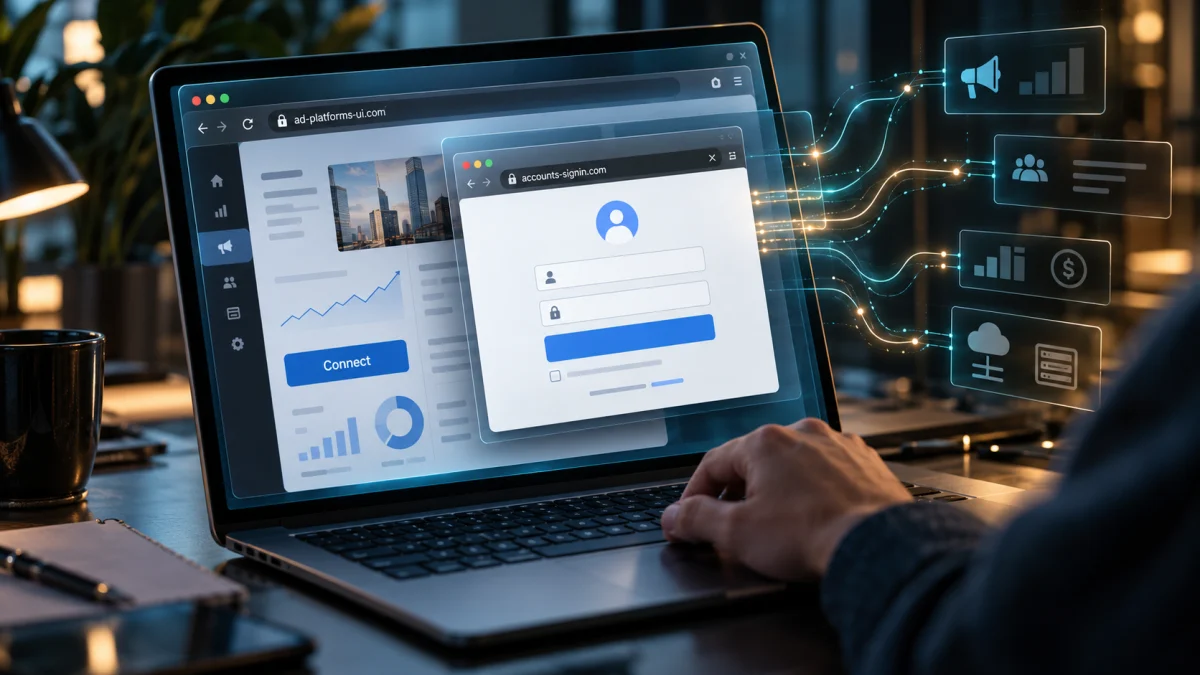
- The user clicks Connect. Instead of launching a genuine sign-in window from Google or the employer’s identity provider, the webpage draws a counterfeit browser window inside the existing page.
- The fake window displays a trusted-looking address. It may visually show
accounts.google.comor an Okta tenant, but those characters appear in a page element controlled by the scammer. The real browser’s address bar remains on the unrelated phishing site. - The victim enters credentials. The platform records submitted usernames and passwords. Island found that the code could retain multiple password attempts rather than simply discard a rejected entry.
- A human operator controls the next prompt. The attacker can display a request for an SMS code, authenticator code, Google approval, or Okta challenge while attempting to use the stolen details.
- If authentication succeeds, the attacker may reach the genuine business account. The consequences then depend on that identity’s permissions, connected services, and the defenses of the real provider.
Island identified reusable components behind the different branded websites, including one backend associated with 73 archived scans across 25 page domains during a May–June observation window. The significance is not the exact number of fake product names. It is that the same phishing machinery can be repackaged around whichever AI brand or business trend looks credible that week.
The fake browser window is the deception
The method is called browser-in-the-browser phishing, often abbreviated BitB. It takes advantage of a familiar expectation: when a legitimate application asks to connect a Google account, users are accustomed to seeing a Google login pop-up.
A fake page can draw nearly every visual part of that pop-up: the window border, tabs, security icon, brand colors, and even a convincing address bar. But that painted-on address is not the browser’s verified destination.
The practical test: Look at the actual address bar belonging to your browser, not a smaller address bar displayed inside the webpage. Better still, leave the invitation and start from the service provider’s official website or an independently verified integration listing. A convincing login window is not proof that the login is genuine.
This matters even when the email or website is unusually polished. In a separate September investigation of a fake Gemini Ads invitation, IRONSCALES found an attacker-owned sending domain whose email passed SPF, DKIM, and DMARC checks and included functional unsubscribe mechanisms. That email analysis did not establish the exact downstream credential-collection mechanism, so it should not be counted as an independently verified takeover by Island’s platform. It does demonstrate a related point: a technically authenticated email can still be sent by the owner of a fraudulent domain.
Which work accounts are being targeted, and what can attackers access?
The observed platform supported sign-in workflows for Google, Meta, TikTok, and Okta. Island describes advertising-agency staff, media buyers, and administrators of manager accounts as particularly valuable targets. Someone who administers multiple clients’ advertising may hold permissions that extend well beyond a single campaign.
The following table distinguishes the credential submitted from the business assets that could be exposed if an attacker successfully signs in. It is a risk and response map, not a claim that each consequence occurred in the observed campaign.
| Credential or account involved | Potential downstream exposure if access succeeds | First place to investigate |
|---|---|---|
| Google account used for Google Ads | Advertising campaigns, budgets, billing arrangements, permissions, and accounts reachable through manager-account links; other Google services depend on the account and applicable controls. | Google Account security and Google Ads account/change history. |
| Google Ads manager (MCC) identity | Multiple client advertising accounts and their account structures, subject to the manager’s actual roles and links. | Every linked client account, manager invitations, user roles, campaigns, and payment profiles. |
| Okta or employer SSO identity | Corporate applications available to that employee, subject to the organization’s SSO configuration, authentication policies, and app permissions. | Employer’s identity administrator, Okta sign-in events, session/token revocation, and downstream app logs. |
| Meta or TikTok advertising credentials | Advertising assets or business-management permissions associated with the identity; scope varies by platform and role. | The relevant platform’s official account-security and business-asset administration tools. |
| Actual OpenAI/ChatGPT account | ChatGPT account content and actions or data available through authorized features and connections, depending on the account, workspace, and permissions. | OpenAI security history, available active sessions, connected accounts, and identity provider. |
| Codex with authorized GitHub access | Repositories and supported actions granted to that integration; write access is not automatic across all repositories. | Codex authorization, GitHub security and app permissions, repository activity, and relevant workspace administrators. |
The last two rows represent a different account-compromise scenario. Island’s October disclosure does not establish that its fake advertising portals collected ChatGPT passwords. They matter because a reader may encounter both stories under headlines about "OpenAI accounts being hacked."
Why an advertising login can become a financial problem
A Google Ads account is more than a profile with a password. Depending on its permissions, it can authorize spending, alter live campaigns, change who manages accounts, and affect multiple clients. An attacker with sufficient access could redirect budgets toward unauthorized advertisements or interfere with a business’s existing campaigns.
That is not merely a theoretical concern about what accounts might do. Google’s official compromised-account procedure specifically addresses unauthorized campaign modifications, budget changes, newly added users or manager accounts, altered payment profiles, and account-structure changes. Google’s guidance also distinguishes ordinary account changes from a manager-level compromise affecting multiple accounts.
It would be misleading, however, to convert these possible consequences into a dollar estimate for the October phishing operation. Island did not establish a verified total of stolen advertising funds in its disclosure, and a submitted password is not proof that an attacker successfully signed in or spent money.
Can the fake login steal MFA codes or bypass two-factor authentication?
It can capture some forms of MFA information, but "MFA was bypassed" is too broad without explaining the method.
In Island’s inspected platform, a human operator could choose screens requesting an SMS code, authenticator-app code, push approval, or other familiar challenge. The operator could then attempt to use the stolen password and time-sensitive response against the legitimate service while the victim was still engaged.
That is real-time MFA phishing. It does not mean the attacker broke the mathematics of the authenticator app. It means the victim was persuaded to provide or approve an authentication step for a login they did not intend to authorize.
Not all MFA methods are equally susceptible:
- SMS and typed authenticator codes can be entered into a fake webpage and reused quickly if the actual provider accepts them before they expire.
- Push approvals can be abused when a user approves an unexpected sign-in request. Number matching makes casual approval harder, but users still need to verify the request.
- Origin-bound passkeys and FIDO2/WebAuthn security keys are designed to resist this particular fake-website technique because authentication is tied cryptographically to the legitimate website’s origin rather than a painted-on address bar.
The U.S. Cybersecurity and Infrastructure Security Agency’s MFA guidance recommends phishing-resistant methods where possible. They are not immunity against every account-security problem: malware, insecure recovery processes, maliciously authorized integrations, and separate platform vulnerabilities still require defenses. But they materially reduce exposure to the reusable password-and-code workflow documented here.
Were OpenAI employee ChatGPT and Codex accounts really hacked?
Yes, in a separate security-research incident on July 25, 2026. Hacktron researchers Harsh Jaiswal, Mohan Pedhapati, and Rahul Maini reported chaining two weaknesses: an image-processing vulnerability affecting the Discourse software behind OpenAI’s community forum, and an OpenAI identity/SSO flaw that turned the forum foothold into access to employee accounts.
The researchers’ technical report, published September 13, describes their limited proof of access: using an employee’s Codex account to open a harmless pull request in OpenAI’s internal GitHub monorepo. They say they deliberately stopped before examining sensitive information.
The chronology is important:
| Date | Documented development |
|---|---|
| July 23–25, 2026 | Hacktron found and developed an image-upload exploit against a vulnerable image-decoding path, then demonstrated the chain against OpenAI’s community forum and identity flow. |
| July 25 | The team demonstrated access to employee ChatGPT/Codex accounts and an internal GitHub repository, then halted testing and coordinated disclosure. |
| July 25 | Hacktron says OpenAI confirmed its side of the issue had been fixed later that day. |
| July 27–28 | Discourse prepared a fix and published its advisory for malformed HEIF image uploads. |
| September 13 | Hacktron published the account of the incident and its disclosure timeline. |
This was a genuine account-takeover demonstration by researchers, not merely a fake sign-in page. Yet the public report does not establish indiscriminate theft of ChatGPT customer accounts, a criminal data-exfiltration campaign, or an unfixed ongoing vulnerability.
The consequential lesson is what happened after researchers gained access: a connected coding tool gave them a pathway to a different protected system. That is why securing an AI identity increasingly means examining what it is authorized to do elsewhere.
Can a compromised ChatGPT account reach Gmail, Drive, Slack, or GitHub?
Potentially, but only within the connections, provider authorizations, available actions, and workspace controls involved. OpenAI’s connected-app documentation explains that apps may let ChatGPT search external services, retrieve information, or perform supported actions. The available powers vary by app, account, and permissions. Connecting one service does not hand ChatGPT universal access to every system in a company.
A separate proof of concept from Check Point Research, published September 8, demonstrated how a ChatGPT cross-account communication weakness could be abused to retrieve information from a victim’s connected Gmail account. Check Point said the particular cross-account channel was no longer available by the time it finished its report and that OpenAI confirmed the implicated internal service had been decommissioned.
That example was not part of Island’s phishing campaign or Hacktron’s account takeover. Its relevance is narrower and more useful: once an AI assistant is allowed to work with outside data, security depends not just on the account password but also on the execution environment, connected services, and permission boundaries.
How to tell if your ChatGPT account was accessed
OpenAI introduced Security history in September 2026. According to its September 25 release notes, it records recent security events such as sign-ins, sign-outs, and changes to MFA or passkeys, with device and location details where available.
For supported accounts, start in ChatGPT at Settings > Security and login > Security history. Look for events you do not recognize, while remembering that location and device information may be approximate. OpenAI also offers Active sessions for reviewing some currently signed-in devices and OpenAI applications.
There is a serious limitation for business users: OpenAI’s Active sessions documentation says the feature is not available to accounts linked to an organization’s SSO sign-in, including SAML or OIDC. It also says that the list does not show or manage third-party app sessions, connected apps, sign-ins used only for third-party services, or Codex CLI sessions.
No suspicious entry in ChatGPT’s session list does not prove your Google, Okta, advertising, or connected-app accounts are safe. In fact, if the stolen credential was for Google or Okta, the decisive logs may be in those providers’ systems, not in ChatGPT.
What to do if you entered your password on a fake ChatGPT site
Act according to the account whose credentials you supplied. A click, a submitted password, and an approved MFA challenge represent different levels of exposure. If you used a company-managed identity, notify your IT or security team promptly, even if you are unsure whether the attempted sign-in succeeded.
If you entered a Google password or MFA code
- Go directly to your Google Account, not back through the AI site or invitation. Change the potentially exposed password and secure any other account that reused it.
- Check Google’s suspicious-activity guidance, review unfamiliar devices and security changes, and remove unauthorized access.
- If the account manages advertising, immediately follow Google Ads’ compromised-account process. Report the suspected takeover and preserve any relevant change history.
- Inspect newly added users and managers, linked manager accounts, campaigns, budget changes, automated rules, and payment profiles. Agencies should check every client account accessible through the affected manager identity, not just the agency’s own dashboard.
- If the device may also have malware, follow Google’s device-security guidance and work from a trusted device when changing credentials.
If fraudulent advertising charges occurred, Google provides an investigation and conditional reimbursement process. Recovery is not guaranteed; eligibility depends on Google’s findings and completion of required recovery steps. Google’s documentation also warns that the wrong account-cleanup decision can affect reimbursement eligibility. Preserve the evidence and review the official workflow carefully.
If you entered Okta or another employer SSO credential
Do not rely on changing a ChatGPT password. Report the event to your organization’s security administrator and identify exactly what you entered: password, one-time code, push approval, or other challenge.
Ask the authorized team to review sign-in events, reset or secure the affected authentication methods as appropriate, assess linked business applications, and revoke suspect sessions or tokens. Okta’s session-revocation documentation describes administrative options for ending user sessions and revoking tokens. The response should follow the organization’s configured identity environment rather than assume one button terminates every application’s access.
If you approved a challenge you did not initiate, say so explicitly. That is more actionable to investigators than merely reporting that you visited a suspicious page.
If you entered your actual OpenAI or ChatGPT credentials
The October Island research does not establish OpenAI-password collection as the primary operation. But if you supplied a real OpenAI password to any suspicious website, handle it as a possible credential exposure regardless of that campaign’s scope.
Follow OpenAI’s official compromised-account guidance: change an exposed password where applicable, review Security history, sign out of available sessions, and contact OpenAI Support about suspicious activity. If you sign in through Google, Microsoft, or workplace SSO, secure that sign-in provider as well.
If your account uses the OpenAI API, inspect usage and revoke and replace exposed API keys. If you use connected apps, review which accounts are connected and disconnect anything suspicious through OpenAI’s connected-account controls. Where warranted, also revoke authorization at the outside service. Disconnecting access does not recover information already copied, and changing an app’s approval settings is not the same as revoking its authorization.
Important: OpenAI says enabling MFA does not cancel existing logins. Secure the credentials and terminate suspicious sessions as part of the response, rather than assuming that switching on MFA automatically ejects an attacker.
If you clicked Connect but did not enter anything
A click alone is not proof of account takeover. Island found that its platform could collect device and browser information during the interaction, but the report does not show that simply opening the fake sign-in window automatically grants access to Google or Okta.
Close the page, do not complete any challenge, and inspect your provider’s account activity if anything unexpected occurred. If you downloaded or executed software, approved an external authorization request, or used a work-managed device, treat those actions as additional reasons to contact IT and assess the endpoint. Do not assume a website is safe merely because you did not type a password.
How businesses can reduce the risk
The immediate problem is phishing, but the larger design weakness is concentrated identity authority: one employee identity may be able to open multiple advertising accounts, access workplace applications, and authorize powerful integrations.
Priorities for organizations managing these identities include:
- Require phishing-resistant authentication for privileged identities wherever supported, particularly advertising manager accounts and enterprise SSO administrators. Audit less-secure fallback and recovery methods.
- Limit advertising-account privileges. Do not give every employee administrator or cross-client manager access by default. Review user invitations, linked managers, and dormant permissions regularly.
- Verify AI integrations independently. A polished product page or seemingly legitimate marketing email is not evidence of a vendor relationship. Confirm new tools through the provider’s official website and documented integration process.
- Review connected-app authorization. OpenAI distinguishes provider-granted access from approval prompts for individual actions. Use the least access required, and understand that an app permission setting does not revoke access already granted. See OpenAI’s app-permission guidance.
- Prepare a cross-platform incident procedure. A Google or Okta compromise must be investigated in the identity provider and downstream business services; a ChatGPT session review is not a substitute.
- Monitor for business changes, not just unusual logins. New advertising managers, account linking, new payment arrangements, unexplained campaigns, and authorization changes can be consequential even when the original credential theft was not noticed.
A simple rule captures the point: before connecting a work account to a new AI tool, verify both the product’s authenticity and the exact access you are about to grant. That is more reliable than attempting to spot a fake from its design alone.
Frequently asked questions
Is ChatGPT being hacked right now?
Two different events are often conflated. The October 6 report documents fake AI-branded phishing sites, not a newly proven breach of ChatGPT’s account database. Separately, researchers demonstrated an OpenAI employee account-takeover exploit in July and reported that it was fixed. The public evidence reviewed for this article does not establish an ongoing, platform-wide ChatGPT customer-account breach.
Can a fake ChatGPT website steal my Google or Okta password?
Yes. Island documented counterfeit login windows collecting submitted credentials and authentication information. The fake ChatGPT branding creates the lure; the password may belong to Google, Okta, or another business identity, not OpenAI.
Can scammers steal a Google Ads manager account through a fake AI tool?
They can attempt to take over the Google identity that has manager-account access. Whether they succeed depends on authentication and account defenses. If they do, their reach is determined by that identity’s permissions and linked accounts. Google has a specific recovery and review process for suspected advertising-account compromises.
Does two-factor authentication stop browser-in-the-browser phishing?
Not always. A fake page can collect typed one-time codes and an operator can attempt to use them in real time, while fraudulent push prompts can deceive users into granting approval. Phishing-resistant passkeys and FIDO2/WebAuthn security keys are stronger against this particular fake-origin technique.
Can a hacked ChatGPT account read my Gmail or Google Drive?
The answer depends on which external accounts are connected, what permissions they were granted, what actions are available, and workspace controls. Access is not automatic or unlimited. Separate security research has demonstrated risks involving connected Gmail data, but the reported cross-account channel used in that proof of concept was no longer available when the researchers published.
What if I use ChatGPT through my employer’s single sign-on?
Secure the employer-managed identity and notify your security team. OpenAI says Active sessions is unavailable for some accounts tied to organizational SSO, so an employee may not be able to investigate a suspected login solely from ChatGPT’s session-management screen.
I typed my password but not the one-time code. Am I safe?
Not necessarily. The submitted password may have been collected even if you stopped before MFA. Change an exposed password promptly using the legitimate provider, check for reuse elsewhere, inspect security activity, and report the event if the identity is managed by an employer. Avoid treating an incomplete phishing flow as evidence that nothing was captured.
What the evidence establishes, and what remains unknown
Verified or directly documented: Researchers identified fake AI advertising sites, a counterfeit browser-window mechanism, operator-controlled credential/MFA prompts, and hundreds of submissions to the platform. Separately, Hacktron demonstrated actual OpenAI employee account access and a harmless internal GitHub pull request before coordinated fixes.
Plausible consequences, not established outcomes in every case: Successful business-account access could permit unauthorized advertising changes, spending, changes to user privileges, or access to connected workplace systems within the compromised identity’s permissions.
Not established by the reviewed disclosures: The number of successful takeovers attributable to the October campaign; a verified total of money stolen through it; wholesale theft of OpenAI customer passwords; or a continuing exploit of the specific OpenAI vulnerability disclosed in July.
The practical lesson is not that every AI service has been breached. It is that the login used to connect an AI-branded product may be the valuable target. The right response begins by identifying which identity was exposed, following its permissions to the systems behind it, and securing those systems through their actual providers.
For the wider pattern of AI-assisted deception, see sherafy.com‘s guide to AI scams in 2026. For a different category of AI security failure involving autonomous agents rather than phishing, see our investigation into OpenAI agents, exposed user images, and sandbox escapes.
References and Further Reading
Primary technical investigations
- Island — Behind the Connect Button: The Fake AI Ads Campaign (October 6, 2026). Original analysis by Oleg Zaytsev and Ofek Ronen of the impersonated AI products, fake browser windows, operator-controlled MFA flow, infrastructure links, observed submissions, and advertising-account targeting. The central source for the current phishing operation.
- Hacktron AI — Hacking OpenAI (September 13, 2026). First-person account of the July image-processing and SSO exploit chain, demonstrated employee ChatGPT/Codex access, proof-of-access GitHub action, and disclosure chronology.
- Discourse — RCE via Malformed HEIF File (GHSA-vhm9-85gw-x335) (July 28, 2026). The underlying software security advisory supporting the forum-side vulnerability and remediation status.
- Check Point Research — The Shared Clipboard Inside the Sandbox: Cross-Account Data Leakage in ChatGPT (September 8, 2026). Separate proof of concept involving connected Gmail information and cross-account communication; explicitly states that the implicated channel was no longer available by publication.
- IRONSCALES — A Beta-Invite Phish That Built Its Own Compliance Kit (September 9, 2026). Independent analysis of a realistic Gemini Ads invitation whose sender passed email authentication checks. Establishes the lure’s credibility, not a confirmed downstream takeover.
OpenAI account security and connected tools
- OpenAI — Keeping Your OpenAI Account Secure. Official instructions for passwords, MFA, security history, sessions, exposed API keys, and suspected unauthorized activity.
- OpenAI — Managing Active Sessions in ChatGPT. Explains SSO unavailability and the limits of which first-party and connected sessions appear in the interface.
- OpenAI — ChatGPT Release Notes (September 25, 2026 entry). Primary record of the Security history feature’s introduction.
- OpenAI — Connecting and Managing App Accounts in ChatGPT. Explains reviewing, disconnecting, and reconnecting individually authorized external accounts.
- OpenAI — Managing App Permissions in ChatGPT. Distinguishes action approvals from provider authorizations and workspace policy.
Credential protection and business-account recovery
- Google — Investigate Suspicious Activity on Your Account. Official guidance for recognizing and addressing suspicious Google-account access.
- Google Ads — What to Do if Your Account Is Compromised. The primary account-recovery procedure covering reporting, change history, managers, campaigns, payment profiles, cleanup decisions, and conditional reimbursement.
- Okta — Revoke All User Sessions. Administrative documentation on clearing Okta sessions and revoking tokens in supported environments.
- CISA — Require Multifactor Authentication. Government guidance explaining why phishing-resistant MFA offers stronger protection than reusable codes.
Editorial currency note (October 11, 2026): This article distinguishes security-research demonstrations, reported phishing activity, possible consequences, and confirmed fixes. Campaign infrastructure, account-security features, provider interfaces, and reimbursement rules can change. The October phishing campaign was reported active when Island published on October 6; that statement is not a claim that every listed phishing domain remained active on October 11. Recheck vendor advisories and provider guidance before following procedures after this publication date.