Most people do not truly possess the information they depend on. They rent access to it through websites, cloud accounts, search engines, streaming services and software platforms.
That arrangement is remarkably convenient—until the internet connection fails, the power goes out, a service shuts down, an account becomes inaccessible or a remote location simply has no reliable connectivity.
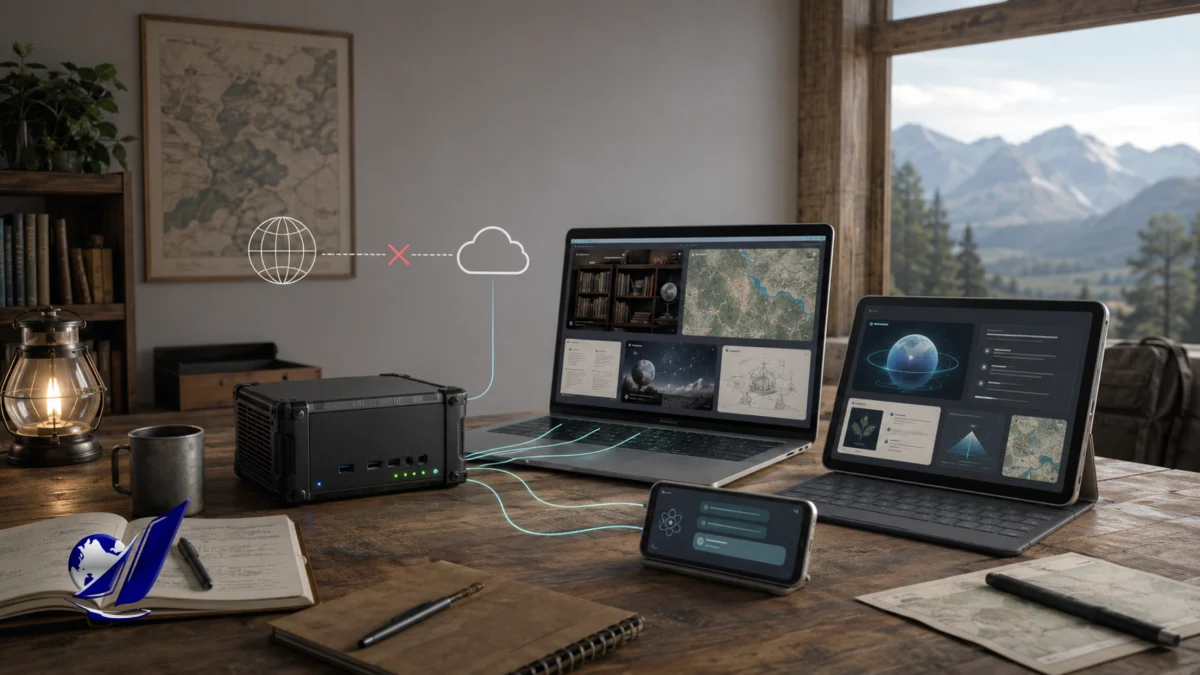
Project NOMAD is a free, open-source platform that turns a suitable Linux computer into a locally hosted server for offline knowledge, maps, education, technical tools and optional artificial intelligence. Once its content has been downloaded, phones, tablets and computers on the same local network can access it through an ordinary web browser without connecting to the wider internet.
NOMAD is sometimes described as an “offline survival computer,” but that label can make the project sound more eccentric than it really is. Its deeper purpose is straightforward: preserve useful knowledge on hardware that you control rather than assuming remote cloud services will always be available.
That makes Project NOMAD relevant not only to emergency preparedness, but also to schools, remote communities, boats, rural properties, workshops, field teams, travelers, privacy-conscious households and anyone interested in reducing dependence on cloud infrastructure.
Project NOMAD at a Glance
| Category | Details |
|---|---|
| Full name | Node for Offline Media, Archives, and Data |
| What it is | A self-hosted, offline-first knowledge and education server |
| Project origin | Started in 2025 |
| Creator | Chris Sherwood of Crosstalk Solutions, LLC |
| Software license | Apache License 2.0 |
| Supported platform | Primarily x86 computers running Ubuntu or Debian-based Linux |
| Core technologies | Docker, Kiwix, Kolibri, Ollama, Qdrant, ProtoMaps, CyberChef and FlatNotes |
| AI requirement | Optional |
| Internet requirement | Required for installation, content downloads and updates; not required for normal offline use |
| Current development status | Active open-source development |
| Latest stable release checked | Version 1.33.0, released June 23, 2026 |
| GitHub activity checked July 20, 2026 | Approximately 34,400 stars, 3,400 forks and 658 commits |
Project documentation says NOMAD was started in 2025 by Chris Sherwood of Crosstalk Solutions, with the stated goal of creating an integrated “survival computer” rather than another isolated utility for storing files. As of July 20, 2026, its GitHub repository displayed roughly 34,400 stars and 3,400 forks, while the latest listed release was version 1.33.0.
What Is Project NOMAD?
Project NOMAD is best understood as an orchestration and management layer.
It is not a new encyclopedia, a new operating system or a single proprietary AI model. Instead, it brings several mature open-source projects together behind one browser-based interface called the Command Center.
Without NOMAD, a technically inclined user could separately install:
- Kiwix for offline Wikipedia and reference libraries
- Kolibri for offline educational courses
- Ollama for running local AI models
- Qdrant for semantic document retrieval
- ProtoMaps for self-hosted offline maps
- CyberChef for data-processing utilities
- FlatNotes for locally stored notes
- Docker to contain and manage the individual services
Project NOMAD packages and manages these systems as a more coherent appliance. Its installer handles many of the dependencies, while its dashboard helps users choose, download, launch and update the components they want.
That integration is the project’s central achievement. The underlying technologies already existed. NOMAD’s contribution is making them operate more like one product rather than a collection of unrelated technical projects.
The Background of Project NOMAD
Project NOMAD emerged from the work of Chris Sherwood and Crosstalk Solutions, a company associated with network design, business phone systems, technical education and the Crosstalk Solutions technology channel. Crosstalk says it was founded in 2014 and draws on experience in network engineering, system architecture and real-world infrastructure deployments.
According to the project’s internal background documentation, development began in 2025. Public attention accelerated in early 2026, particularly after technology publications and self-hosting communities began discussing the project. A March 2026 Cybernews report described NOMAD as a passion project that bundled offline Wikipedia, maps, education, data tools and local AI. At that time, the repository reportedly had about 11,300 GitHub stars; by July 20, 2026, GitHub displayed approximately 34,400.
That growth does not prove that the software is flawless, but it does show that NOMAD has touched a genuine concern: modern computing has become deeply dependent on infrastructure that users neither own nor control.
The project’s “apocalypse computer” framing may attract attention, but its strongest argument is not that the global internet is about to vanish forever. It is that temporary disconnection, cloud outages, expensive bandwidth, censorship, natural disasters and remote operating environments are already normal realities for many people.
How Project NOMAD Works
A typical NOMAD installation follows five stages.
1. NOMAD Is Installed on a Linux Computer
The supported installation path uses a Debian-based operating system, with Ubuntu recommended. The installer requires administrator privileges and sets up the Command Center, database, Docker environment and related services.
Once installed, the main interface is normally accessed through a browser at the server’s local address on port 8080. Other devices on the same network can reach it by entering the NOMAD machine’s local IP address.
2. The User Selects Applications and Content
During setup, users decide which parts of the system they want. Someone could build a lightweight knowledge library without installing the AI assistant, or create a larger deployment containing Wikipedia, educational courses, regional maps, technical documentation, survival manuals and AI-searchable personal files.
This modular approach matters because offline content can consume considerable storage. A user interested primarily in first aid and repair manuals does not need to download the same collection as a school, research vessel or software development team.
3. NOMAD Downloads the Chosen Material
The initial installation and content downloads require an internet connection. Once the files are stored locally, however, NOMAD can continue serving them without outside connectivity.
The information library is largely powered by Kiwix, an established open-source project that stores websites and reference collections in compressed ZIM archives. A ZIM file can contain an offline copy of Wikipedia, educational material, documentation, books, medical references or other web-based resources.
4. NOMAD Serves the Material Across a Local Network
A NOMAD server can be connected to an ordinary router or wireless access point. Nearby phones, tablets and computers then access it through their browsers.
The important distinction is that the local network can remain functional even when the router has no connection to an internet service provider. NOMAD communicates directly with devices inside that network rather than reaching out to a remote server for every page or query.
5. The Optional AI Searches and Summarizes Local Material
If the AI features are enabled, NOMAD can use Ollama to run compatible language models and Qdrant to perform semantic search over indexed documents.
This process is generally known as retrieval-augmented generation, or RAG.
In simplified terms:
- Documents are divided into smaller passages.
- An embedding model converts those passages into numerical representations of their meaning.
- Qdrant stores those representations.
- When the user asks a question, NOMAD searches for conceptually relevant passages.
- The retrieved material is sent to the local language model as context.
- The model generates an answer based partly on that retrieved material.
Qdrant describes vector search as a way to retrieve information by semantic meaning rather than relying only on exact keyword matches.
This does not permanently train the language model on the user’s library. It gives the model selected passages at the time of the question.
That distinction is important. A document may be stored and browsable in Kiwix but still unavailable to the AI if it has not been successfully extracted, divided and indexed.
What Is Included in Project NOMAD?
Offline Wikipedia and Reference Libraries
Kiwix provides the foundation for NOMAD’s information library. Depending on the chosen collection, users can store:
- Wikipedia
- Wikibooks
- Wikiversity
- Project Gutenberg books
- Medical references
- Repair and self-reliance guides
- Programming documentation
- Linux and Docker documentation
- Educational videos
- Other ZIM-packaged websites and reference collections
The size of a full English Wikipedia archive varies by release date and package type. Project NOMAD’s FAQ estimates approximately 125 gigabytes for an image-inclusive version, while a March 2026 hands-on report referenced a package of approximately 99.6 gigabytes. Smaller text-only, compact and popular-article editions require much less space.
These figures should be treated as changing snapshots rather than permanent specifications. Wikipedia grows, archive formats change and different packages include different levels of media.
Offline Education Through Kolibri
NOMAD integrates Kolibri, an offline-first educational platform developed by Learning Equality.
Kolibri is more than a folder containing videos. It can support organized courses, exercises, learner progress and multiple users. Learning Equality says the platform was specifically designed for teaching and learning in environments where internet access is limited or nonexistent.
This may be one of NOMAD’s most socially significant capabilities. A properly prepared server could support learning in a home, temporary shelter, community center, rural school or other environment where continuous internet access cannot be assumed.
Educational availability should not be confused with curriculum approval, however. The usefulness of a deployment depends on the languages, subjects, educational standards and content channels selected by its administrator.
Offline Maps
NOMAD uses ProtoMaps to provide downloadable regional maps derived substantially from OpenStreetMap data.
ProtoMaps packages map tiles into PMTiles archives that can be stored and served locally. OpenStreetMap itself is a global community-created geographic database released under an open license.
These maps can provide roads, labels, bodies of water and other geographic context without a live mapping service. However, NOMAD should not be confused with a complete offline navigation system. A hands-on TechHut review noted that its map component is a functioning offline map viewer, not a turn-by-turn GPS navigation service.
The maps also remain snapshots. They will not automatically know that a bridge closed yesterday, a wildfire changed direction or a road was newly constructed unless updated map data is downloaded.
Local Artificial Intelligence
NOMAD’s AI assistant is optional. The knowledge library, maps and educational tools can operate without it.
When installed, the assistant can:
- Answer questions using a local language model
- Search indexed reference material
- Summarize retrieved documents
- Work with uploaded personal files
- Help users navigate a large offline library
- Run without sending each prompt to a commercial cloud chatbot
Ollama provides the model-running layer, while Qdrant provides the retrieval system. NOMAD can also be configured to connect to another Ollama host or compatible API endpoint.
The AI should be understood as a navigation and synthesis tool—not an independent authority. NOMAD’s own FAQ explicitly warns that local AI can be wrong and says the underlying downloaded references should remain the source of truth.
Data Tools and Notes
NOMAD includes CyberChef, a browser-based suite for operations such as encoding, decoding, hashing, encryption-related transformations and data analysis. It also integrates FlatNotes for locally stored Markdown notes.
These are not strictly emergency tools. They can be useful in routine technical work, documentation, research and system administration.
The Supply Depot and Custom Applications
Version 1.33.0 expanded NOMAD’s Supply Depot, an application catalog through which users can install additional services. It also added support for user-selected Docker containers, including custom port mappings, storage volumes, environment variables and resource limits.
This moves NOMAD closer to a general-purpose offline application platform.
It also increases the administrator’s responsibility. Every additional container is another software image that must be trusted, maintained and updated. NOMAD performs configuration checks and warns about certain risks, but it cannot guarantee that every third-party container is secure or appropriate.
What Makes Project NOMAD Important?
It Creates a Local “Knowledge Floor”
Project NOMAD cannot reproduce the entire internet. The internet is not merely a collection of pages. It includes live databases, communications, social activity, financial systems, news, weather, remote computing and constantly changing information.
NOMAD does something narrower but still valuable: it creates a minimum body of knowledge that remains available when remote services are not.
That distinction is critical. A NOMAD server does not preserve current situational awareness. It preserves selected reference material.
It can tell you how electrical systems generally work. It cannot tell you whether a specific power line is currently energized.
It can store medical references. It cannot replace an examination by a qualified clinician.
It can display an offline street map. It cannot automatically know whether a road is presently blocked.
The system is strongest when treated as a resilient library, not an infallible command center.
It Makes Digital Independence More Practical
It has long been possible to download Wikipedia, run a local language model or build a self-hosted map server. The obstacle has been complexity.
Project NOMAD lowers that barrier by putting the components behind one installer and one management interface. Its value lies less in inventing new technology than in making existing technologies usable together.
This is similar to the difference between possessing a box of computer parts and possessing a configured computer. The parts may be available to everyone, but integration determines whether ordinary people can use them productively.
It Separates Knowledge Access From Account Access
Cloud platforms frequently connect information access to an account, subscription, API key or continuing business relationship. A locally stored NOMAD library does not disappear because a vendor changes its terms or ends a service.
That does not make the system maintenance-free. It does mean that the user has direct possession of the stored files and software.
It Can Serve Multiple Devices
Because NOMAD is a server rather than merely a desktop application, one installation can be accessed by other devices on the local network. A family, classroom or field team does not necessarily need a separate copy of every large archive on every phone or laptop.
That architecture is particularly useful when storage, bandwidth and device capabilities are limited.
Hardware Requirements and Realistic Costs
The NOMAD software is free, but a serious installation is not literally costless. It requires hardware, storage, electricity, initial download bandwidth, maintenance and time.
The project publishes three broad hardware tiers:
| Use level | Project-recommended configuration | Approximate project price range |
|---|---|---|
| Library-first or basic AI | Refurbished x86 mini PC or desktop, 16–32 GB RAM, 500 GB SSD, integrated graphics | $150–$300 |
| Balanced installation | Recent AMD mini PC, 32 GB RAM, 1 TB NVMe storage, capable integrated graphics | $500–$800 |
| AI-heavy installation | Desktop or eGPU system, 32–64 GB RAM, 1–2 TB NVMe storage, RTX 3060 12 GB or better | $1,000+ |
These are Project NOMAD’s own recommendations, not an independent hardware benchmark. Prices and AI performance will change as processors, memory, models and software improve.
The management platform itself has modest minimum requirements: a 2 GHz dual-core processor, 4 GB of RAM and 5 GB of free storage. Those specifications should not be confused with the requirements for a useful content library or responsive local AI. The selected archives and models will determine the real hardware burden.
A practical library containing Wikipedia, maps, courses, technical references and several AI models can easily justify a one-terabyte drive. Users planning extensive AI indexing may need substantially more.
The Hidden Cost of AI Indexing
Compressed ZIM archives are efficient for browsing, but converting their content into a searchable AI knowledge base can require much more storage.
In a May 2026 design document, NOMAD’s maintainers warned that indexing a 10-gigabyte ZIM file could consume anywhere from roughly 1 to 100 gigabytes in Qdrant, depending on how text-dense the archive is. The same document warned that CPU-only indexing of dense archives could take hours or even days per gigabyte. These numbers describe project development estimates rather than universal performance guarantees, but they illustrate why “the download has finished” does not necessarily mean “the AI can now search everything.”
Users who only need conventional offline browsing can avoid much of this burden by leaving certain archives out of the AI index.
Does Project NOMAD Actually Protect Privacy?
Project NOMAD is capable of operating in a highly private configuration, but its privacy should be described precisely rather than absolutely.
The project states that it has no built-in telemetry and that a locally configured AI can process prompts on the user’s own hardware. Normal offline use does not require a cloud account.
However, several qualifications matter.
Privacy Depends on the Selected AI Endpoint
NOMAD can be configured to use an AI service running on another machine or an OpenAI-compatible endpoint. Ollama itself now supports both local and cloud models. Therefore, a NOMAD installation is private only when the user actually selects local models and keeps the relevant services local.
Users seeking strict offline operation should verify that:
- The model is stored locally
- The embedding model is local
- The configured API endpoint is local
- Ollama’s cloud features are disabled
- No third-party container has been granted unnecessary network access
- Automatic updates are configured according to the user’s threat model
“No Telemetry” Does Not Mean “No Outbound Request While Online”
The project repository explains that NOMAD checks internet connectivity using a Cloudflare utility endpoint, with GitHub and the Project NOMAD API as fallbacks. The test URL can be changed through configuration. That is a connectivity check rather than evidence of behavioral telemetry, but privacy-sensitive administrators should still be aware that the software can make outbound requests when connected.
The safest formulation is therefore:
Project NOMAD can keep its libraries, prompts and AI processing local, provided the administrator configures it for local-only operation and understands the behavior of every installed component.
Project NOMAD’s Most Serious Security Limitation
Project NOMAD does not include ordinary user authentication by default.
The project intentionally prioritizes easy local access. Anyone who can reach an exposed NOMAD service on the same network may therefore be able to access functions that would normally be protected by a login. The maintainers advise users not to expose the system directly to the public internet.
The official website provides a community-supported Caddy reverse-proxy guide that can place basic authentication in front of administrative pages. But the guide makes clear that this is a network-level workaround, not a native NOMAD account system. It does not create per-user accounts or encrypt stored content. It is also not presented as sufficient protection for direct public-internet exposure.
This has several consequences:
- NOMAD is best placed on a trusted home, classroom or organizational network.
- Remote access should not be created by casually forwarding its ports through a router.
- Sensitive documents should not be uploaded without considering who can access the network.
- A school or organization may need network segmentation and additional access controls.
- NOMAD is not presently a drop-in enterprise document system with granular permissions and audit controls.
For a personal offline appliance, the simplified access model may be acceptable. For a multi-user or publicly accessible deployment, it is a major architectural limitation.
The Limitations of Project NOMAD
1. Offline Information Becomes Outdated
Every offline library is a snapshot.
The longer it remains disconnected, the greater the difference between its stored material and the current state of the world. Historical articles may remain useful for years, while medical guidance, software documentation, laws, maps and security practices may require frequent updates.
One TechHut review found that some medical PDFs available in the tested collection dated from the early 2000s. That does not mean all NOMAD medical material is outdated, but it demonstrates why users must evaluate individual sources instead of assuming that “downloadable” means “current.”
2. The AI Can Produce False or Misleading Answers
Running an AI model locally changes where the computation happens. It does not eliminate hallucinations, reasoning failures or misleading summaries.
A local model may:
- Misinterpret a question
- Retrieve irrelevant passages
- Miss the correct document
- Combine unrelated sources
- Invent unsupported details
- Overstate uncertain information
- Rely on its preexisting model knowledge instead of the local references
NOMAD’s own documentation appropriately tells users to treat the source documents, rather than the generated answer, as authoritative.
3. The RAG System Is Still Developing
The project’s public issue tracker shows continued work on document ingestion and retrieval quality.
A July 2026 bug report described a case in which only a small percentage of articles from certain ZIM archives appeared to be embedded into Qdrant. Another open proposal noted that storing many unrelated subjects in one flat collection could increase retrieval noise. A separate roadmap issue proposed genuine hybrid retrieval combining semantic and lexical search, acknowledging that the current approach primarily uses dense retrieval with limited keyword boosting.
These are public user and developer reports, not proof that every installation experiences the same failures. They do show that NOMAD’s AI knowledge pipeline should still be considered an actively evolving system rather than a finished, independently validated research product.
4. Offline Maps Are Not Live Navigation
The map can show stored geographic information, but it does not inherently provide:
- Live traffic
- Current road closures
- Wildfire perimeters
- Weather radar
- Emergency alerts
- Real-time transit
- Automatic turn-by-turn routing
A conventional compass, dedicated offline navigation application and updated emergency maps may still be necessary.
5. NOMAD Does Not Provide Communication
An offline knowledge server can tell users what they previously downloaded. It cannot by itself contact emergency services, receive new instructions or communicate with the outside world.
A complete resilience plan might also require radio, satellite messaging, local mesh networking, backup power and printed critical information. NOMAD is one layer of resilience, not the entire system.
6. Open Source Does Not Remove the Need for Curation
The NOMAD codebase is released under Apache 2.0, but the archives, maps, educational materials, model weights and third-party applications it manages may have their own licenses and usage conditions. OpenStreetMap data, for example, is distributed under the Open Database License and requires attribution.
Anyone redistributing a preloaded NOMAD device should review the license and redistribution terms of each included dataset, model and application.
Who Is Project NOMAD Best For?
Project NOMAD is particularly compelling for:
Preparedness-Oriented Households
A home server can preserve first-aid references, repair manuals, food-safety information, maps, encyclopedic material and educational resources for use during an extended outage.
Remote and Off-Grid Properties
A cabin, farm, vessel or remote facility may have intermittent or expensive connectivity. NOMAD can keep routine references available locally even when external service disappears.
Schools and Community Centers
Kolibri and Kiwix can support structured education and broad reference access without requiring every learner to maintain an individual high-bandwidth connection.
Field Teams
Engineers, researchers, humanitarian teams and technical crews could preload the documentation, maps and manuals relevant to a particular mission.
Privacy-Conscious AI Users
Someone who wants document search and AI assistance without routinely uploading private files to a commercial service may find NOMAD’s local architecture useful—provided it is securely configured.
Self-Hosting Enthusiasts
NOMAD is an approachable way to combine multiple self-hosted tools without manually designing the entire stack.
Who May Not Need It?
Project NOMAD may be excessive for someone who only wants offline Wikipedia. Kiwix alone is simpler and available across more operating systems.
It may also be unsuitable for someone who:
- Expects a completely configured consumer device
- Does not want to maintain Linux or Docker
- Needs live information rather than stored references
- Requires enterprise authentication and detailed permissions
- Wants advanced GPS navigation
- Has very limited storage
- Assumes a local AI will be as capable as the largest cloud models
- Wants a Raspberry Pi-based system
The NOMAD project does not currently sell its own prebuilt hardware. Its FAQ says the software is intended for x86 Linux systems, does not run natively on macOS, is not designed for Raspberry Pi and offers a community-supported Windows installation route through WSL2.
Is Project NOMAD Really an “Apocalypse Computer”?
Technically, it can serve that role. But the phrase should not obscure what the project actually does.
NOMAD does not place “the internet” inside a computer. It places selected artifacts from the internet—articles, maps, books, courses, manuals and models—inside a locally controlled system.
That is a smaller promise, but a more defensible one.
The internet is dynamic. NOMAD is archival.
The internet connects people. NOMAD preserves resources.
The internet provides current information. NOMAD provides continuity when current information is unavailable.
Its real value is therefore not predicting the end of the internet. It is recognizing that reliable access should not be confused with permanent access.
Final Assessment
Project NOMAD is a serious and unusually well-integrated attempt to make offline knowledge practical.
Its real innovation is not Wikipedia, local AI, offline maps or educational software. All of those existed before NOMAD. Its innovation is treating them as parts of one locally controlled knowledge appliance.
The project is strongest when evaluated as:
- A resilient digital library
- An offline educational server
- A local reference platform
- A privacy-capable AI interface
- A framework for assembling self-hosted applications
It is weakest when imagined as:
- A perfect copy of the internet
- A source of real-time intelligence
- An infallible medical or technical authority
- A secure public cloud service
- A replacement for communication systems
- A maintenance-free consumer appliance
The project also remains young. Its public development activity, frequent releases and open issue tracker show meaningful momentum, but they also reveal unresolved questions around indexing, retrieval quality, storage demands and authentication.
The right conclusion is neither that Project NOMAD is a magical answer to digital collapse nor that it is merely a novelty for survivalists.
It is an effort to establish something modern computing has gradually surrendered: a body of useful knowledge that remains available because the user physically possesses it.
That principle has value even if the global internet never disappears. Networks fail. Services close. Accounts become inaccessible. Remote communities remain underserved. Cloud platforms change their terms. Information that exists somewhere is not necessarily information that will remain available to you.
Project NOMAD attempts to close that gap—not by rebuilding the internet, but by ensuring that losing a connection does not mean losing everything.
Frequently Asked Questions About Project NOMAD
What is Project NOMAD?
Project NOMAD, or Node for Offline Media, Archives, and Data, is free, open-source software that turns an x86 Linux computer into a local server for offline reference libraries, maps, education, utilities and optional artificial intelligence.
Does Project NOMAD work without the internet?
Yes, after the software and selected content have been downloaded. Installation, content acquisition and updates require connectivity, but the stored applications and libraries can then be accessed through a local network without an external internet connection.
Is Project NOMAD free?
The NOMAD software is free and released under the Apache License 2.0. Users remain responsible for the computer, storage, electricity, networking equipment and any other hardware they choose to use.
Who created Project NOMAD?
The project was started in 2025 by Chris Sherwood of Crosstalk Solutions, LLC.
Is artificial intelligence required?
No. Kiwix libraries, maps, educational resources and other applications can operate without installing the AI assistant.
Is Project NOMAD’s AI completely private?
It can be, when the language model, embedding model, document index and API endpoint all remain local. NOMAD can also be connected to remote endpoints, so privacy depends on the configuration selected by the administrator.
How much storage does Project NOMAD need?
A bare installation requires little storage, but a useful library can grow rapidly. Project documentation estimates that a full English Wikipedia archive with images may require approximately 125 gigabytes and recommends considering a one-terabyte drive for a broader collection containing maps, courses and AI models. AI indexing may consume additional space beyond the original archive sizes.
Can Project NOMAD run on a Raspberry Pi?
The project is not designed for Raspberry Pi. It targets more capable x86 hardware, particularly because local AI can require substantial memory and graphics processing. The project recommends Internet-in-a-Box as a lighter Raspberry Pi-oriented alternative.
Can Project NOMAD run on Windows or macOS?
The primary supported environment is Ubuntu or Debian-based Linux. A community-supported WSL2 installation path exists for Windows. NOMAD does not currently run natively on macOS.
Is it safe to expose Project NOMAD to the public internet?
Not by default. NOMAD does not include native authentication and its maintainers advise against direct public-internet exposure. A community-supported Caddy configuration can protect certain administrative functions, but it does not add complete user management or encrypt stored data.
References and Further Reading
Official Project NOMAD Sources
- Project NOMAD Official Website — Main overview of the platform, features and use cases.
- Project NOMAD GitHub Repository — Source code, technical architecture, installation instructions, activity and licensing.
- About Project NOMAD — Background on the project’s name, origin and stated mission.
- Project NOMAD Frequently Asked Questions — Official answers concerning AI, privacy, storage, operating systems and costs.
- Recommended Project NOMAD Hardware — Project-recommended budget, balanced and high-performance configurations.
- Project NOMAD Installation Guide — Supported installation process and system requirements.
- Project NOMAD Caddy and Authentication Guide — Security limitations and community-supported reverse-proxy configuration.
- Project NOMAD Version 1.33.0 Release Notes — Details on Supply Depot custom applications, container management and other June 2026 changes.
- Crosstalk Solutions — Background on the organization behind Project NOMAD.
- Project NOMAD Press Coverage Index — Collection of external articles and discussions about the project.
Independent Coverage and Hands-On Reviews
- Cybernews: YouTuber Releases “Apocalypse Ready” Off-Grid Knowledge Server — March 2026 overview, background and early adoption figures.
- TechHut: Run Wikipedia, Maps and AI Offline With Project NOMAD — Hands-on installation notes, feature testing, security observations and practical limitations.
Core Technologies Used by NOMAD
- Kiwix — Open-source platform for accessing Wikipedia and other web-based resources offline.
- Kiwix Reader and ZIM Files — Explanation of compressed ZIM archives and offline browsing.
- Kolibri by Learning Equality — Offline-first educational and course-management platform.
- Ollama Documentation — Documentation for running compatible language and embedding models.
- Ollama Local-Only Configuration — Guidance for disabling Ollama cloud features.
- Qdrant Documentation — Vector database and semantic retrieval technology used by NOMAD’s AI knowledge base.
- ProtoMaps — Open-source, self-hostable map archive technology.
- OpenStreetMap Copyright and License — Licensing and attribution requirements for OpenStreetMap data.
Development, RAG and Known Limitations
- Knowledge Base Ingestion Redesign RFC — Maintainer discussion of indexing time, storage costs, incomplete ingestion and proposed improvements.
- ZIM Embedding Bug Report #1069 — July 2026 report concerning incomplete embedding of certain ZIM archives.
- Hybrid Retrieval Proposal #947 — Proposal to combine dense semantic retrieval with stronger lexical search.
- Knowledge-Base Collection Organization Proposal #1062 — Discussion of retrieval noise when unrelated subject areas share one large vector collection.