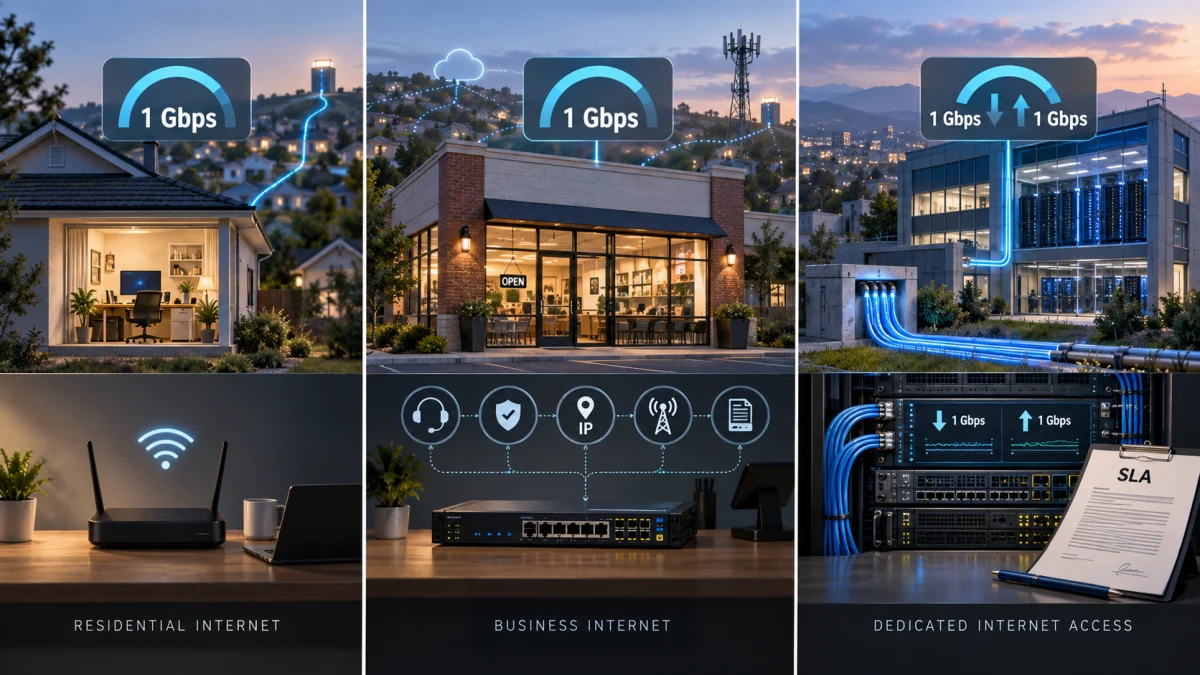
A home internet plan and a business internet plan can both advertise 1 Gig, yet the business may pay $30, $50, $60 or more extra every month.
The obvious question is: If both connections are 1 Gbps, what exactly is the business paying for?
The short answer is that Mbps tells you how much bandwidth the connection advertises, not everything included in the service. Business plans may add commercial-use rights, business support, cybersecurity, static-IP options, cellular backup, installation, guest networking, price guarantees and other features.
But there is an equally important part of the answer:
Ordinary business internet is not automatically a dedicated internet connection. It does not automatically include a service-level agreement, guaranteed repair time, faster uploads or a static IP.
That distinction matters because many explanations of “business internet vs. home internet” accidentally describe expensive Dedicated Internet Access, or DIA, as though every small-business broadband plan works that way.
It does not.
The Same 1 Gig Can Carry a Very Different Price
Current provider pricing makes the question unusually easy to see.
The examples below were checked on September 21, 2026. Internet pricing varies by location, eligibility and promotion, so they should be treated as examples of product structure rather than universal quotes.
| Provider | Residential 1 Gig example | Business 1 Gig example | Approximate difference |
|---|---|---|---|
| AT&T | $90/mo standard broadband-label price | $140/mo | $50/mo |
| Verizon Fios | $89.99/mo | $149/mo | $59.01/mo |
| GFiber | $70/mo | $100/mo | $30/mo |
| Spectrum | $60/mo promotional home price | $115/mo business price | $55/mo |
AT&T’s federal broadband disclosure lists its consumer Internet 1000 service at $90 per month, with typical speeds around 999.6 Mbps down and 946.9 Mbps up. AT&T currently advertises Business Fiber 1 GIG at $140 per month and includes a gateway with 5G internet backup and installation. AT&T Internet 1000 broadband disclosure AT&T Business Fiber plans
Verizon provides an even cleaner comparison. Its residential Fios 1 Gig tier advertises speeds up to 940/880 Mbps for $89.99 per month, while Fios Business 1 Gig advertises the same 940/880 Mbps maximum at $149 per month, before eligible Auto Pay savings. The business tier currently includes unlimited data and a three-year price guarantee tied to its offer terms. Verizon residential Fios pricing Verizon Fios Business plans
GFiber advertises residential 1 Gig service at $70 per month in current markets such as California, while Business 1 Gig is $100 per month. GFiber’s business service adds business-oriented networking and support features, but the headline bandwidth itself remains 1 Gig. GFiber residential plans GFiber Business plans
Spectrum currently advertises residential Internet Gig at $60 per month for one year, while Business Internet 1 Gig is advertised at $115 per month and includes Advanced WiFi with Security Shield and Guest WiFi. Spectrum residential Internet Gig Spectrum Business Internet plans
So the price difference is real.
But the reason cannot simply be “business internet is faster.” Sometimes the advertised speed is nearly identical.
“1 Gig” Does Not Describe the Whole Product
A bandwidth number tells you one important property of an internet service.
It does not necessarily tell you:
- whether bandwidth is dedicated or shared;
- what upload speed you receive;
- how the provider handles a service outage;
- whether performance is contractually guaranteed;
- whether a static IP is available;
- whether cellular backup is included;
- what cybersecurity services are bundled;
- what type of support queue you enter;
- whether the account permits commercial use;
- how long the price is guaranteed;
- whether the provider proactively monitors the connection.
That is why comparing internet plans using only Mbps can be misleading.
Two airline tickets can travel the same distance while purchasing very different products. Internet bandwidth works similarly: the headline number matters, but it does not describe all the service wrapped around it.
There Are Really Three Types of Internet Being Mixed Together
The biggest source of confusion is that discussions about “business internet” commonly combine three different categories.
1. Residential broadband
This is ordinary mass-market internet sold to households.
It may be fiber, cable, fixed wireless or another technology. Modern residential fiber can already offer excellent performance, symmetrical speeds, unlimited data and very high reliability.
2. Mass-market small-business broadband
This is the category many shops, offices, restaurants and small companies actually buy.
It can use much of the same underlying broadband infrastructure as residential service while adding commercial account terms and business-oriented features.
The Federal Communications Commission effectively recognizes this middle category in its broadband mapping system.
Under the FCC’s Broadband Data Collection guidance on serviceable locations, business locations such as restaurants, salons, doctor’s offices and small stores can be locations expected to buy mass-market, non-enterprise-grade internet service.
Large office buildings and corporate campuses expected to purchase customized enterprise-grade connectivity are treated differently.
That distinction is important.
Small-business broadband and enterprise internet are not synonyms.
3. Dedicated Internet Access
Dedicated Internet Access is where the service architecture genuinely changes.
Instead of merely buying a broadband tier advertised as “up to” a particular speed, a customer purchases dedicated capacity with contractual performance obligations.
Verizon describes its Internet Dedicated service as bandwidth that is not shared with other organizations and includes SLAs covering metrics such as latency, packet loss and jitter.
Comcast’s Dedicated Internet service similarly advertises symmetrical dedicated bandwidth and a 99.99% SLA covering uptime and performance metrics.
That is a materially different product from simply ordering the business version of a cable or fiber broadband plan.
Is Business Internet Actually Dedicated?
Not necessarily.
This is probably the single most important misconception surrounding business internet pricing.
Spectrum’s standard Business Internet Gig page says the service is delivered through its fiber-powered network using hybrid fiber-coax infrastructure. On the same page, Spectrum separately advertises Dedicated Fiber Internet, backed by its own uptime SLA. Spectrum Business Internet Gig
Comcast does essentially the same thing.
Its ordinary small-business Internet plans advertise speeds up to 2 Gbps, 24/7 customer service, security and no data caps. Comcast then separately offers Dedicated Internet, with dedicated symmetrical capacity and contractual performance guarantees. Comcast Business Internet plans Comcast Dedicated Internet
Verizon explicitly explains the difference itself: broadband uses shared network capacity, while its Internet Dedicated product provides bandwidth dedicated to that customer’s circuit and protected by SLAs.
So if your bill says Business Internet, do not automatically assume that the provider constructed a private gigabit pipe exclusively for your company.
Ask.
What Does the Business Internet Premium Actually Buy?
The answer varies substantially by provider and plan, but several added services are real.
Business-focused customer support
Business connectivity can fail at a particularly bad time.
A household losing internet during a movie is inconvenient. A restaurant losing its cloud point-of-sale system during dinner service can lose money immediately.
Providers therefore commonly sell business customers access to business-specific support organizations.
Comcast says its standard Business Internet plans include 24/7 customer service, while Spectrum advertises 24/7 U.S.-based business support. Comcast Business Internet features Spectrum’s business support explanation
That has economic value.
But there is an important distinction:
Someone answering the phone 24 hours a day is not the same thing as a contractual promise that your service will be restored within a specified period.
For that, you need to read the actual service commitment or SLA.
Static IP addresses
A static public IP address stays consistent rather than changing periodically.
That can matter if a business:
- hosts services reachable from the internet;
- needs IP-based allow-listing;
- operates certain VPN configurations;
- remotely manages network equipment;
- needs a predictable address for specific servers or systems.
But a static IP is not necessary for every small business, and it is not automatically included with every business plan.
Spectrum, for example, describes static IP service as an add-on for businesses that need it. GFiber allows business customers to configure static IP options and includes a static IP with some higher-tier business offerings. Spectrum guidance on choosing business internet GFiber Business features
If your business operates entirely through services such as Microsoft 365, Google Workspace, cloud accounting, web-based point-of-sale systems and ordinary SaaS applications, you may have no practical need for one.
Cybersecurity and managed WiFi
Some providers bundle network-level security features into business packages.
Spectrum Business Internet Gig currently includes Advanced WiFi with Security Shield and Guest WiFi, while Comcast says its Business Internet plans include foundational SecurityEdge protection. Spectrum Business Internet pricing and features Comcast Business Internet features
These services may help block known malicious domains, phishing attempts and other threats before traffic reaches devices.
They should not be confused with a complete cybersecurity program. A network-level filtering service does not eliminate the need for device security, software updates, access controls, backups and good credential practices.
Backup internet
Backup connectivity can be one of the more valuable business-specific features, but the details matter.
AT&T’s current Business Fiber 1 GIG offering includes 5G internet backup. Its own product terms also note that the wireless backup does not function during a loss of local electrical power unless the necessary equipment remains powered.
Spectrum’s Invincible WiFi goes further by combining 5G failover with an included battery designed to keep the equipment operating during an outage. Comcast’s Wireless Connect similarly combines Business Internet with wireless backup and battery capability as an additional service. Spectrum Invincible WiFi details Comcast Wireless Connect backup service
This is why the phrase “includes backup internet” is not enough.
A business should ask:
Backup from what?
A cable cut? Provider outage? Modem failure? Power outage?
Those are different failure modes.
Commercial-use terms
One thing a business plan unquestionably changes is the contractual relationship between the customer and the provider.
Residential service agreements can restrict commercial use.
Spectrum’s current residential Acceptable Use Policy expressly allows ordinary work-from-home use, but prohibits using residential service to operate a business or commercial enterprise. Spectrum residential Acceptable Use Policy
Verizon’s Fios Customer Agreement states that residential service is for personal residential use and says customers may be required to obtain a commercial account for commercial use. Verizon Fios Customer Agreement
The exact rule therefore depends on the provider.
Simply answering emails for your employer from a home office is not necessarily treated the same as operating a customer-facing company, hosting commercial systems or supplying internet access to customers.
What Business Internet Does Not Automatically Give You
This is where many comparisons go wrong.
| Claim | Safe to assume from the words “Business Internet”? |
|---|---|
| Dedicated bandwidth | No |
| Formal SLA | No |
| Guaranteed repair time | No |
| Faster uploads | No |
| Static IP included | No |
| 24/7 business support | Common, but verify |
| Cellular backup | Sometimes |
| Battery-backed cellular backup | Sometimes |
| Business cybersecurity features | Sometimes |
| Commercial account terms | Yes, generally |
The practical rule is simple:
If a feature matters enough to justify paying extra, verify that the plan actually includes it.
Do not buy the word “business.”
Buy the service terms.
A Reliability Claim Is Not the Same as an SLA
Another common source of confusion is a provider advertising extremely high network reliability.
A reliability percentage sounds like a guarantee, but it is not necessarily one.
There are at least four different things a provider might be describing:
Historical network reliability: How the network has generally performed.
Service guarantee: A promise that may entitle a customer to some form of credit when certain conditions are met.
Support commitment: A target for answering or escalating customer problems.
Service-level agreement: A contractual commitment covering defined metrics and remedies.
A true DIA SLA can specify things such as:
- availability;
- latency;
- packet loss;
- jitter;
- repair timeframes;
- service credits when commitments are missed.
Verizon’s dedicated product, for example, explicitly identifies SLA guarantees covering latency, packet loss and other performance measurements. Comcast explicitly backs Dedicated Internet with a 99.99% SLA.
That is much stronger than a marketing statement saying a network is “99.99% reliable.”
Business Internet Does Not Always Have Faster Uploads
Another standard explanation says business internet costs more because business connections provide symmetrical upload and download speeds.
Sometimes they do.
But fiber has made this explanation increasingly unreliable.
Verizon’s residential and business Fios 1 Gig examples both advertise speeds up to 940 Mbps down and 880 Mbps up.
GFiber likewise sells symmetrical fiber connectivity to both residential and business customers in its fiber markets.
If both the residential and business products already provide high symmetrical or near-symmetrical performance, faster upload speed cannot explain the business premium.
On cable networks, however, the comparison may be very different. Upload performance should therefore be compared directly rather than inferred from whether the bill says “home” or “business.”
How Much of the Price Difference Is Simply Market Segmentation?
This is the most interesting question and the hardest one to answer from public information.
Providers clearly incur some additional costs serving business accounts.
Business customers can receive different support, equipment, installation, security, backup services, billing arrangements and contractual terms.
Those things are not free.
But published plan descriptions do not reveal how much of a $30 or $60 monthly premium represents:
- additional provider cost;
- additional support overhead;
- bundled features;
- greater commercial liability or account complexity;
- the business customer’s higher willingness to pay for continuity;
- ordinary market segmentation;
- additional profit margin.
The fact that two plans use similar infrastructure or advertise the same bandwidth does not prove their costs are identical.
But the reverse is equally important:
A provider charging substantially more for the business version does not prove that the underlying connection costs substantially more to deliver.
Businesses often value connectivity differently because a lost connection can stop revenue-producing activity.
That gives providers room to package and price business service around the economic value of staying connected rather than merely the marginal cost of transmitting another gigabyte.
Without internal provider cost and margin data, however, it would be speculation to assign a percentage of the business premium to that effect.
Can You Just Use Residential Internet for a Small Business?
Sometimes.
A freelancer, consultant or remote worker operating from home may find that a good residential fiber connection already supplies more bandwidth than the business needs.
The technical requirements may be nearly identical.
The more important questions are:
- Does your provider’s residential agreement permit your type of use?
- What happens financially if the connection fails?
- Do you need a static IP or specialized networking?
- Do you need business-level support or a contractual service commitment?
- Do you need customer WiFi, network security or automatic failover?
Spectrum provides a useful example of why the first question matters. Its residential policy specifically permits ordinary work-from-home activity while restricting use of the residential service to operate a commercial enterprise.
So “I work from home” and “my home is the operating location of my commercial business” may not be treated identically.
This is usually a question of the provider’s service agreement rather than a universal rule that every person earning money from home must purchase business internet.
When Residential Internet Is Probably Enough
Residential service may make economic sense when:
- you are primarily working remotely rather than operating a customer-facing location;
- your provider permits the intended use;
- downtime is inconvenient rather than financially damaging;
- you do not need a static IP;
- you do not host systems that require inbound connectivity;
- you already have an adequate mobile hotspot or secondary connection;
- residential support is sufficient;
- the residential connection already provides the upload performance you need.
A one-person consulting business using cloud applications may gain very little from paying an extra $50 every month merely to have the word “business” on the account.
When Business Internet Starts Making Sense
The calculation changes when an internet outage can shut down the business.
Consider a restaurant or retailer whose connection supports:
- point-of-sale transactions;
- VoIP phones;
- online ordering;
- inventory systems;
- security cameras;
- cloud applications;
- employee communications;
- customer WiFi.
The connection is no longer merely a convenience.
In that situation, better support, commercial terms, managed networking, cybersecurity or automatic backup connectivity may justify a higher monthly cost even if the primary connection itself still runs across mass-market broadband infrastructure.
When You Actually Need Dedicated Internet
Dedicated Internet Access occupies another category entirely.
It begins to make financial sense when a business needs contractually predictable network performance, not merely a fast connection.
Potential use cases include businesses where:
- even short outages cause substantial financial losses;
- guaranteed availability is required operationally;
- predictable latency or packet loss matters;
- very large amounts of data must move consistently in both directions;
- critical applications depend continuously on cloud connectivity;
- a company requires formal SLA remedies;
- redundant or diverse circuits are being designed into a larger continuity strategy.
DIA can cost dramatically more than ordinary broadband.
That does not make it a scam or an automatic upgrade. It is a different product aimed at a different risk profile.
The Better Question: How Much Downtime Would Make Business Internet Worth It?
Instead of asking whether business internet is generally “better,” a business owner can turn the decision into a simple break-even calculation.
Suppose:
Residential internet: $90/month
Business internet: $150/month
The additional cost is:
$60 per month × 12 = $720 per year
Now estimate the cost to your business of being offline for one hour.
Suppose one hour without connectivity costs approximately $500 in lost revenue, payroll disruption or other losses.
The annual premium would break even if the business service prevented or shortened:
$720 ÷ $500 = 1.44 hours of downtime per year
That is a potentially compelling economic case.
But there is one major catch:
Paying more does not itself prove the business plan will eliminate 1.44 hours of downtime.
You still need to determine what the provider is actually promising.
If the extra $720 buys cellular failover, faster escalation and a meaningful restoration commitment, the calculation may be reasonable.
If it buys essentially the same broadband connection with different billing and a few features you do not need, the answer may be very different.
Nine Questions to Ask Before Paying Extra for Business Internet
Before signing a commercial internet agreement, ask the provider these questions:
- Is the bandwidth shared or actually dedicated?
- Does this plan include a contractual SLA?
- Exactly what does the SLA guarantee?
- Is there a repair or restoration-time commitment?
- What are the actual upload speeds?
- Is a static IP included, optional or unavailable?
- Does backup connectivity come with the plan, and does it work during a power outage?
- What happens to the monthly price after any promotional or guarantee period?
- Which feature am I receiving on this plan that I would not receive on the residential alternative?
That final question may be the most useful one.
If the salesperson cannot clearly explain what the additional monthly charge buys, the words Business Internet are not an answer.
Bottom Line
Business internet can legitimately cost more than residential internet even when both advertise the same Mbps.
The extra price may buy valuable services: commercial support, security, backup connectivity, static-IP options, installation, business networking features, commercial-use terms or predictable pricing.
But ordinary small-business broadband is not automatically Dedicated Internet Access.
It does not automatically provide dedicated bandwidth, a formal SLA, a static IP, faster uploads or guaranteed restoration simply because the provider calls it a business plan.
A 1 Gbps label tells you how much bandwidth is being advertised.
It does not tell you everything you are buying.
The right comparison is therefore not simply:
1 Gig vs. 1 Gig.
It is:
What does each plan actually promise, and what would losing internet cost your business?
References and Further Reading
FCC and Broadband Classification
- FCC Broadband Data Collection: About the Fabric and Broadband Serviceable Locations — Explains the FCC’s distinction between locations expected to purchase mass-market, non-enterprise-grade broadband and locations associated with customized enterprise connectivity.
Current Residential and Small-Business Plans
-
AT&T Internet 1000 Broadband Facts disclosure — Current standardized consumer disclosure showing the monthly price and typical download/upload performance of AT&T Fiber Internet 1000.
-
AT&T Business Fiber Internet plans — Current Business Fiber pricing and included features, including 5G backup on qualifying 1 GIG service.
-
Verizon residential Fios pricing comparison — Lists current residential Fios speeds and pricing, including Fios 1 Gig at up to 940/880 Mbps.
-
Verizon Fios Business Internet plans — Current small-business Fios pricing, speeds, contract provisions and price guarantees.
-
GFiber residential internet plans — Current residential GFiber pricing, including the $70 1 Gig example.
-
GFiber Business Internet plans — Current Business 1 Gig and 2 Gig pricing and business-specific networking features.
-
Spectrum residential Internet Gig — Current residential Gig pricing and offer details.
-
Spectrum Business Internet plans — Current small-business pricing and features, including Advanced WiFi, Security Shield and Guest WiFi on Business Internet 1 Gig.
-
Comcast Business Internet plans — Details standard small-business broadband features including 24/7 customer service, no data caps and SecurityEdge.
Dedicated Internet and SLAs
-
Verizon Internet Dedicated — Explains dedicated bandwidth, symmetrical service and SLAs covering network-performance metrics.
-
Comcast Business Dedicated Internet — Documents dedicated symmetrical capacity and Comcast’s 99.99% SLA-backed Dedicated Internet product.
-
Spectrum Business Internet Gig and Dedicated Fiber comparison — Useful primary evidence that Spectrum’s ordinary Business Internet and Dedicated Fiber Internet are distinct products.
Backup, Security and Business Features
-
Spectrum Business Advanced WiFi and Invincible WiFi — Details Security Shield, guest networking, 5G failover and battery-backed backup options.
-
Comcast Business Wireless Connect — Explains Comcast’s optional multi-network wireless backup and battery-backed connectivity.
Residential Use Terms
-
Spectrum Internet Acceptable Use Policy — Distinguishes permitted work-from-home use from operating a commercial enterprise over Spectrum residential service.
-
Verizon Fios Customer Agreement — Sets out Verizon’s residential-use restriction and treatment of commercial use.
Editorial currency note: Provider prices, promotions, availability, service features and contractual terms can change and may vary by address. Pricing and product information in this article were checked on September 21, 2026. Readers making a purchasing decision should confirm the current broadband label, plan details and service agreement for their specific location.