
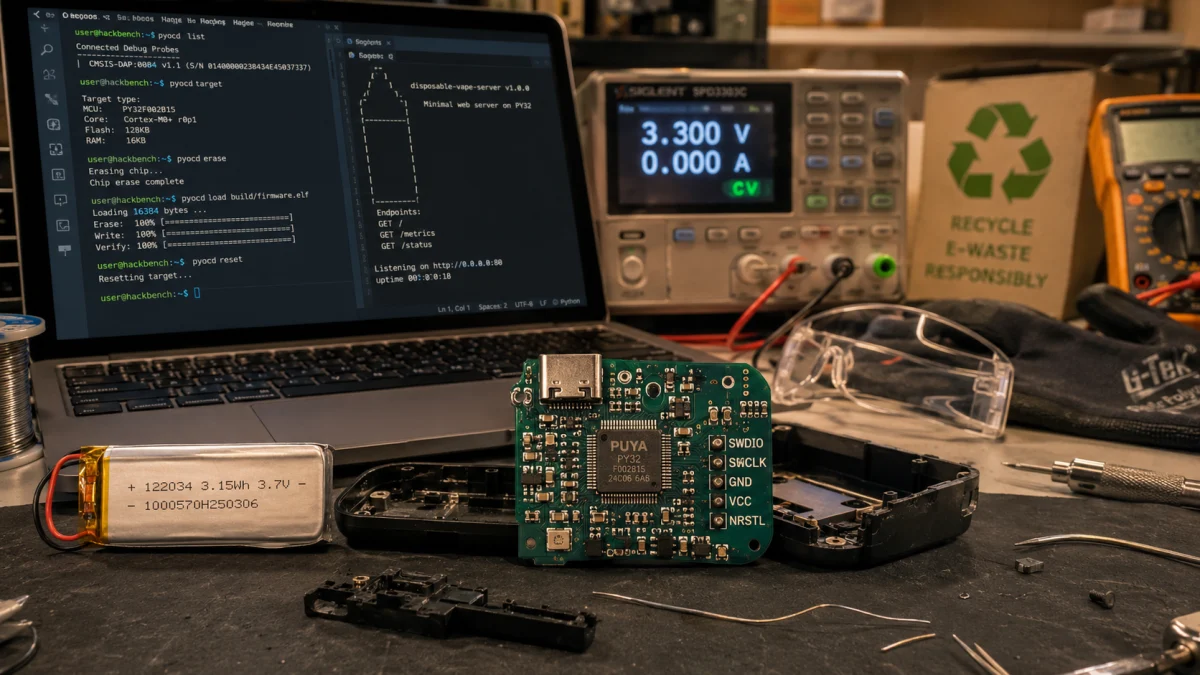
A disposable vape should be one of the least interesting computers on Earth. It is marketed as a dead-end object: inhale, deplete, discard. But inside certain “disposable” vapes is not magic, and not merely waste. It is a lithium-ion battery, a circuit board, USB-C charging hardware, sensors, LEDs, power-control circuitry, and, in some newer models, a real Arm microcontroller.
That is the uncomfortable part. The bin is not empty. It is full of small computers that were never given a second life.
In 2025, engineer Bogdan Ionescu, known online as BogdanTheGeek, demonstrated this in the most direct way possible: he took the microcontroller from a disposable vape and made it serve a web page. The chip he worked with was a PUYA/PY32-class Arm Cortex-M0+ microcontroller with roughly 24 KiB of flash and 3 KiB of SRAM. His first attempt was slow. After optimizing the data path, the server reached roughly 20 ms ping times and loaded a page in about 160 ms. (Bogdan The Geek)
This guide explains how that works, what hardware you actually need, what the viral posts usually leave out, and how to reproduce the idea as a beginner-to-intermediate embedded systems project.
The honest version: what you are actually building
You are not turning a random vape into a normal Wi-Fi router. You are not plugging the vape into the wall and getting a public web server.
The verified build works like this: the vape’s microcontroller runs a tiny HTTP server using the uIP TCP/IP stack. It communicates with a host computer through SWD debugging and semihosting. On the host computer, pyOCD forwards semihosting I/O to a local TCP port. socat turns that TCP stream into a virtual serial device. slattach then treats that virtual serial device as a SLIP network link. The result is that your computer can reach the microcontroller at a local IP address, such as 192.168.190.2. (GitHub)
That may sound less magical than “a vape became the internet,” but it is more interesting. It means a throwaway product can run a real TCP/IP stack, answer HTTP requests, and expose a small API from a chip with less memory than a modern web page uses before it finishes blinking.
Safety first: do not skip this part
Disposable vapes contain lithium-ion cells, nicotine residue, and small electronics not designed for repair. Do not buy new vapes for this project. Do not work on a swollen, punctured, crushed, hot, leaking, or corroded cell. Do not solder directly to a lithium battery. Do not short the battery terminals. Do not put lithium-ion batteries in household trash or normal recycling; the EPA says lithium-ion batteries and devices containing them should be taken to separate battery recycling or household hazardous waste collection points because they can cause fires during transport and processing. (US EPA)
For this project, the safest approach is to treat the battery as something to remove or isolate, not something to reuse. Power the PCB from a regulated 3.3 V source or a proper debug setup, ideally current-limited. Wear eye protection, work on a nonflammable surface, wash your hands after handling the device, and keep the cell away from heat and metal tools. A Joule study on disposable e-cigarette lithium-ion cells found that they can retain useful cycling capacity, but also documented serious thermal hazards under damage testing, which is exactly why this project should be approached as electronics recovery, not casual battery reuse. (ScienceDirect)
Why this matters beyond the novelty
The web server is the hook. The e-waste story is the real subject.
The UN’s Global E-waste Monitor reported that the world generated 62 million tonnes of e-waste in 2022, while only 22.3% was documented as formally collected and recycled. That gap is not abstract. It is the difference between designed recovery and designed disappearance. (UNITAR)
Disposable vapes are a sharp example because they combine a battery, a circuit board, metals, plastic, and chemical residue in a product marketed as temporary. In the UK alone, Material Focus reported that single-use vape waste had reached nearly 5 million discarded units per week in 2023, with hundreds of millions purchased annually and enough lithium discarded each year to represent thousands of electric-vehicle batteries’ worth of material. (Material Focus)
A vape web server will not solve e-waste. But it does expose the lie underneath a lot of consumer electronics: “disposable” often means “no second life was designed,” not “no second life is possible.”
What kinds of vapes can work?
Not every disposable vape can become a web server. Many use simple ASICs, black epoxy blobs, or locked-down controller chips that are not practical for a beginner to reprogram. The project is most realistic when the vape contains a recognizable Arm microcontroller and accessible SWD pads.
The original build found a PUYA-marked chip and identified it as a PY32-class microcontroller. The published project was configured for py32f002bx5, and the PY32F002B family includes a 32-bit Arm Cortex-M0+ core, up to 24 MHz operation, up to 24 KB of flash, and 3 KB of SRAM. (Bogdan The Geek)
Look for a vape PCB with:
| Feature | Why it matters |
|---|---|
| A visible microcontroller package | You need a programmable chip, not just a black epoxy blob. |
| Markings such as PUYA / PY32 / C642 | These may indicate a Cortex-M0+ class MCU similar to the original build. |
| Debug pads labeled SWDIO, SWCLK, GND, VCC, NRST | Labeled pads make the project much easier. |
| USB-C charging board | Often correlated with more advanced disposable designs, though USB-C itself is not the network link here. |
| A removable or isolatable battery | Safer for bench work and debugging. |
If the board has no identifiable MCU, no debug pads, or a damaged battery, recycle it properly and use another board.
Tools and parts
You will need:
| Item | Purpose |
|---|---|
| Compatible disposable vape PCB | The recovered target hardware. |
| SWD debug probe | A CMSIS-DAP, DAPLink, Picoprobe, J-Link, or ST-Link-class probe can work with pyOCD depending on support. pyOCD documents support for CMSIS-DAP, Picoprobe, J-Link, ST-Link, and remote probe plugins. (pyOCD) |
| Fine soldering iron, flux, thin wire | For connecting to SWD pads. |
| Multimeter | To verify ground, voltage rails, and continuity. |
| Bench power supply or regulated 3.3 V source | Safer than relying on the vape battery. |
| Linux computer | Easiest environment for socat, slattach, pyOCD, and networking. |
| Arm GNU Toolchain | Provides arm-none-eabi-gcc, binutils, and GDB for Cortex-M firmware builds. (Arm Learning Paths) |
| pyOCD | Programs and debugs the Arm Cortex-M target. |
socat, net-tools, perl, gzip, make, git | Required by the project build and SLIP bridge. |
The reference repository lists the main software requirements as an Arm microcontroller supported by pyOCD, socat, pyOCD 0.39.0 or newer, Perl, and net-tools for slattach on Linux. (GitHub)
Step 1: Open the vape safely and remove the non-electronics
Work slowly. The goal is not to destroy the enclosure; the goal is to recover the PCB without damaging the battery.
Remove the mouthpiece and outer shell. Separate the e-liquid reservoir from the electronics. Use gloves if residue is present. Do not puncture the battery pouch or cylindrical cell. If the cell is swollen, hot, or damaged, stop. Place it in a fire-safe location and dispose of it through an approved battery or hazardous waste route.
Once the PCB is accessible, identify:
- Battery leads or battery connector
- USB-C connector, if present
- Main microcontroller
- MOSFET or heater-control transistor
- Airflow sensor
- LEDs
- Test pads or debug pads
Take photos before touching anything. You will want a reference for polarity, pad labels, and component orientation.
Step 2: Identify the microcontroller
Clean the chip surface gently with isopropyl alcohol and inspect the marking under magnification. The original build found a PUYA-marked chip and eventually treated it as a PY32F002B/PY32C642-like device. The published Makefile targets py32f002bx5, uses a 24 MHz CPU frequency, and compiles for Cortex-M0+. (Bogdan The Geek)
Good signs:
- Marking includes
PUYA,PY32,C642, or similar. - Board has labeled debug pads.
- pyOCD can detect or connect to the target.
- The chip is not covered by epoxy.
Bad signs:
- No visible MCU.
- Only a black blob.
- Burned or corroded PCB.
- Battery leakage or physical damage.
- Debug access appears disabled.
Step 3: Locate SWD pads
SWD, or Serial Wire Debug, is the two-wire debug interface used on many Arm Cortex-M microcontrollers. You are looking for at least:
| Pad | Meaning |
|---|---|
| GND | Ground reference |
| VCC / 3V3 | Target voltage reference or power |
| SWDIO | Serial Wire Debug data |
| SWCLK | Serial Wire Debug clock |
| NRST / RESET | Optional reset line |
Do not guess with the battery connected. Use a multimeter to confirm ground. If pads are labeled, follow the labels. If they are not labeled, compare the chip package to the datasheet and trace likely pins, but this moves the project from beginner-friendly into reverse-engineering territory.
Wire the debug probe to the board:
Debug probe GND   -> Vape PCB GND
Debug probe VTref -> Vape PCB 3V3 or VCC reference
Debug probe SWDIO -> Vape PCB SWDIO
Debug probe SWCLK -> Vape PCB SWCLK
Debug probe RESET -> Vape PCB NRST, if available
Power only one way. Do not power the board from the vape battery and the debug probe at the same time unless you fully understand the power path. For safety, use a current-limited 3.3 V supply and keep the battery isolated.
Step 4: Install the software toolchain
On a Linux machine, install the basics:
sudo apt update
sudo apt install -y git make python3 python3-pip socat net-tools perl gzip
Install the Arm GNU Toolchain so these commands are available:
arm-none-eabi-gcc --version
arm-none-eabi-gdb --version
Install pyOCD:
python3 -m pip install --user --upgrade pyocd
export PATH="$HOME/.local/bin:$PATH"
pyocd --version
If pyOCD does not recognize the target, use pyOCD’s pack support to install additional device support. pyOCD documents CMSIS-Pack management through its pack subcommand for adding target support. (pyOCD)
A typical check looks like this:
pyocd list --targets | grep -i py32
Step 5: Clone the reference project
The published code is in BogdanTheGeek’s semihost-ip repository. The project is configured to run TCP/IP over SWD using semihosting, SLIP, and uIP. (GitHub)
git clone https://github.com/BogdanTheGeek/semihost-ip.git
cd semihost-ip
Build it:
make
The Makefile targets py32f002bx5, builds a Cortex-M0+ firmware image, generates a tiny filesystem, flashes with pyOCD, and provides convenience targets for serve, tty, slip, and speedtest. (GitHub)
Step 6: Flash the firmware
Connect the SWD probe and verify pyOCD can see the target:
pyocd list
Then flash and start the semihosting server:
make flash serve
In the reference Makefile, serve starts GDB and pyOCD with semihosting routed to a telnet-style TCP port. pyOCD supports routing semihosting console I/O to a telnet server, which is the bridge that makes the rest of the networking trick possible. (GitHub)
Step 7: Create the virtual serial link
Open a second terminal in the same project directory:
make tty
This runs socat, creating a pseudo-terminal and linking it to pyOCD’s semihosting TCP port. The reference project uses this to make the semihosting stream look like a serial device. (GitHub)
Step 8: Attach SLIP networking
Open a third terminal:
make slip
On Linux, this uses slattach to attach a network interface to the virtual serial line, assigns the host side to 192.168.190.1, assigns the microcontroller side to 192.168.190.2, and brings up the sl0 interface. slattach exists specifically to put a terminal or serial line into network mode for point-to-point links. (GitHub)
Test the interface:
ping 192.168.190.2
curl http://192.168.190.2/
The project’s README says the server can be reached with ping 192.168.190.2 or curl http://192.168.190.2:80 after the bridge is running. (GitHub)
Step 9: Understand the network path
The system looks like this:
Browser or curl
      |
Host TCP/IP stack
      |
SLIP interface: sl0
      |
Virtual TTY made by socat
      |
pyOCD semihosting telnet port
      |
SWD debug probe
      |
Disposable vape microcontroller
      |
uIP HTTP server
The microcontroller is running the web server. The host computer is acting like the modem, network adapter, and bridge. That distinction matters. Without the host and debugger, the vape PCB is not independently online.
uIP is a good fit because it was designed for tiny embedded systems with very limited code and RAM budgets. Its small footprint is why a chip with only a few kilobytes of SRAM can participate in TCP/IP at all. (Dunkels)
Step 10: Customize the page
In the reference project, the tiny web content lives inside the uIP filesystem directory and is converted into C data during the build. The Makefile compresses the page and regenerates fsdata.c before compiling the firmware. (GitHub)
Keep the page brutally small. This is not a place for React, analytics scripts, external fonts, or images. Think in bytes, not megabytes.
A realistic page might be:
<!doctype html>
<html>
<head>
  <meta charset="utf-8">
  <title>VapeServer</title>
</head>
<body>
  <h1>Hello from e-waste.</h1>
  <p>This page is being served by a recovered microcontroller.</p>
</body>
</html>
Then rebuild and flash:
make clean
make
make flash serve
The reference code also includes a small JSON-style API handler for a status endpoint that can return values such as hits, chip UID, and runtime. (GitHub)
Troubleshooting
| Problem | Likely cause | Fix |
|---|---|---|
| pyOCD cannot find the target | SWD wiring error, no power, wrong target name, unsupported chip | Check GND, VCC, SWDIO, SWCLK, reset, and target voltage. Confirm py32f002bx5 support or install a CMSIS-Pack. |
make fails | Missing Arm toolchain or missing Perl/gzip | Confirm arm-none-eabi-gcc, make, perl, and gzip are installed. |
make serve starts but nothing loads | socat or SLIP bridge is not running | Start the three terminals in order: make flash serve, make tty, make slip. |
slattach fails | Missing net-tools or permission issue | Install net-tools; run the SLIP target with sudo as the Makefile expects. |
| Ping is slow or lossy | Buffer settings, poor SWD connection, weak power, long wires | Shorten wires, improve grounding, use stable 3.3 V power, and try the reference buffer settings. |
| Browser hangs | Page too large or bridge not running | Test with curl first; reduce page size. |
| Device heats up | Power fault or battery problem | Disconnect immediately and inspect safely. Do not continue with a damaged cell or board. |
How fast can it be?
The original article reports that the first version was almost unusable: roughly 1.5 second ping times, packet loss, and page loads over 20 seconds. After replacing byte-at-a-time I/O with buffered reads and batched writes, the build reached roughly 20 ms ping times and about 160 ms page loads. (Bogdan The Geek)
The GitHub README is slightly more conservative for default settings: around 70 ms ping times, about 400 ms page loads, and throughput up to around 10 KiB/s for larger pages. That difference matters because the fastest configuration uses more RAM, while the default setup leaves more headroom. (GitHub)
In other words: yes, it can be surprisingly fast. No, it is not a production server. The value is not capacity. The value is proof.
What this project teaches
This project teaches three things at once.
First, “disposable” is often a business model, not a technical property. The device may be sold as temporary even when it contains rechargeable chemistry, a programmable microcontroller, and a circuit board sophisticated enough to be debugged, flashed, and networked.
Second, small computers are still computers. A 24 MHz Cortex-M0+ with 24 KiB of flash and 3 KiB of SRAM sounds laughable beside a modern phone, but it can still speak TCP/IP, answer HTTP, and serve a page when the software is written for the hardware instead of against it.
Third, e-waste is not only a materials problem. It is a design problem. When a product has no repair path, no software path, no recovery path, and no planned second use, the waste was not an accident at the end. It was part of the architecture from the beginning.
Limitations and responsible use
Do not expose this server directly to the public internet. It is an educational embedded project, not a hardened network appliance.
Do not claim every vape contains a useful microcontroller. Many do not.
Do not claim the verified project uses built-in Wi-Fi. It does not. The network path depends on SWD, pyOCD semihosting, a host computer, and SLIP. (GitHub)
Do not reuse or charge salvaged lithium cells unless you have the proper equipment, knowledge, and safety controls. The more professional version of this project is not “power things with random vape batteries.” It is “recover computing hardware, learn from it, and dispose of hazardous components correctly.”
FAQ
Can any disposable vape become a web server?
No. You need a vape PCB with a programmable microcontroller and accessible debug pads. The reference build used a PUYA/PY32-class Arm Cortex-M0+ microcontroller; many vapes use simpler or less accessible electronics. (Bogdan The Geek)
Does the vape connect to Wi-Fi?
Not in the verified build. The microcontroller communicates through SWD debugging and semihosting. A host computer turns that stream into a local SLIP network interface. (GitHub)
What IP address does the vape server use?
The reference project uses 192.168.190.2 for the microcontroller and 192.168.190.1 for the host side of the SLIP link. (GitHub)
Is this beginner-friendly?
It is beginner-friendly only if “beginner” means you already know basic soldering and can follow Linux terminal instructions. It is better described as a beginner-to-intermediate embedded systems project.
Can I use the vape battery?
For a professional how-to guide, the safer recommendation is no. Isolate or remove the battery and power the PCB with a regulated, current-limited supply. Lithium-ion batteries can become fire hazards when damaged or mishandled, and they should be recycled through appropriate channels. (US EPA)
What is the practical use?
The practical use is education, hardware recovery, and proof-of-concept embedded networking. It is not a replacement for a Raspberry Pi, ESP32, or production web server. Its value is in showing how much functional computing gets discarded inside products designed to disappear.
Closing
One engineer with a discarded vape built a web server. The deeper question is not whether the page loaded in 160 ms. The deeper question is why a product with a rechargeable cell, a programmable microcontroller, a circuit board, and enough architecture to speak TCP/IP was ever allowed to be called disposable in the first place.
The web page is the demo. The waste stream is the database. And the next frontier of computing may not only be in the cloud, the lab, or the data center.
Some of it is already in the bin.