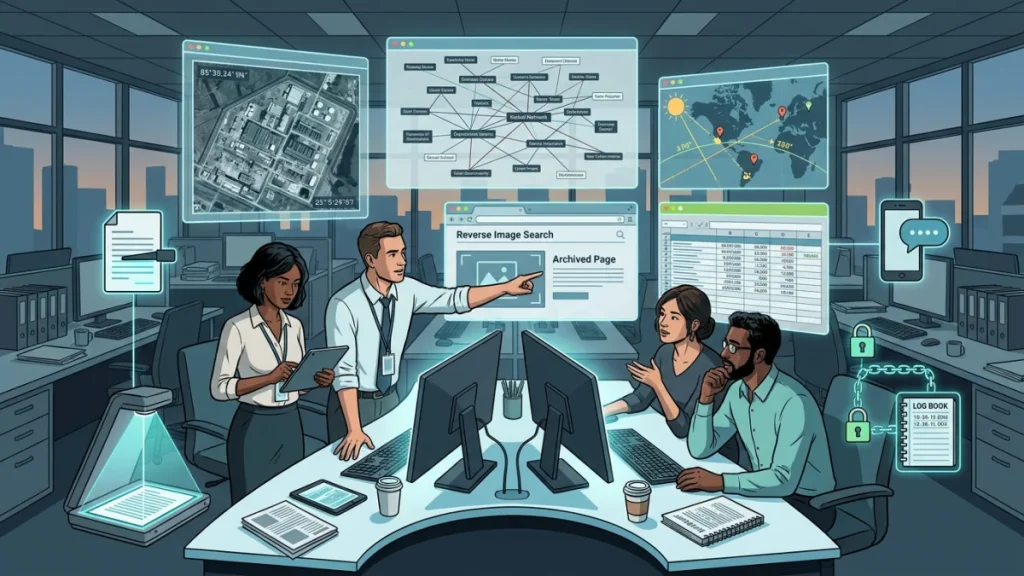
Open source intelligence, or OSINT, is best understood as disciplined analysis built from information that is publicly or commercially available and lawfully obtained. In official U.S. intelligence usage, OSINT is “intelligence derived exclusively from publicly or commercially available information.” For journalists, that translates into a practical method: use public records, archived web pages, corporate filings, satellite imagery, social posts, court records, contracts, academic literature, and metadata, then verify and connect them rigorously enough that the result can survive scrutiny. [1]
That is why OSINT matters so much now. The Berkeley Protocol notes that investigators can now work from a vast array of publicly available satellite imagery, videos, photographs, smartphones, and social media posts, but it also warns that digital open source information has often been used in an ad hoc way and that poor collection and preservation practices can undermine reliability, admissibility, and public trust. In other words: the opportunity is huge, but the method matters as much as the source. [2]
For journalists, the most important mindset shift is this: OSINT does not replace reporting. It supplements and strengthens traditional work such as interviews, records requests, field reporting, and expert consultation. GIJN’s investigative guides and the UN-backed Berkeley Protocol both emphasize that open source information is most valuable when used alongside other reporting methods and when gathered, analyzed, and preserved with clear standards. [3]
The workflow that makes OSINT trustworthy
A strong OSINT investigation normally starts with a narrow question, not a pile of tools. GIJN’s reporting guides stress that sourcing begins with thinking about the goal of the story, and the Berkeley Protocol places preparation and planning before collection. In practical newsroom terms, that means writing down the core claim, the names of people and entities involved, the places, the time window, and the kinds of records most likely to answer the question. [4]
Preserve before you analyze. The Berkeley Protocol’s preservation guidance is blunt: online information is precarious, can be removed or altered, and should be preserved in ways that maintain authenticity and document chain of custody. Bellingcat built Auto Archiver for exactly this problem, and Hunchly is designed around transparent evidence capture and preservation. If a page, post, or video could disappear, the right first move is usually capture, hash, archive, and log. [5]
Verify in layers. The Berkeley Protocol highlights geolocation, chronolocation, internal consistency, and external corroboration as core verification concepts. In practice, you want to answer at least four questions about every important item: who posted it, what exactly it shows, when it was created or uploaded, and where it was made or observed. Tools like InVID, Amnesty’s YouTube DataViewer, reverse image search, satellite browsers, and sun-position tools help answer those questions, but the standard is corroboration, not tool output alone. [6]
Keep originals and create working copies. The Berkeley Protocol defines chain of custody as the chronological documentation of custodianship and handling, and it recommends preserving evidentiary copies in original form. A practical adaptation for reporters is simple: keep the raw file or first capture untouched, do your transformations on copies, and record what you changed, when, and why. [7]
Threat-model your reporting. CPJ advises journalists to assess what information they hold, what could happen if it falls into the wrong hands, and what protections to use before starting risky work. EFF’s Surveillance Self-Defense makes the same point through “threat modeling,” and the Berkeley Protocol extends the risk frame beyond digital harms to legal, physical, financial, reputational, and psychosocial harms. This is especially important for citizen journalists and small outlets, because a simple investigation into corruption or police abuse can quickly become a source-protection problem. [8]
The result is a repeatable loop: scope the question, collect likely sources, preserve them immediately, verify the strongest items, normalize the data, map relationships, then publish with transparent sourcing. That loop is what turns “searching online” into actual intelligence work. [9]
The core toolkit
A durable OSINT stack is larger than 25 tools because real investigations span discovery, capture, verification, records, geolocation, data cleaning, link analysis, and source protection. Bellingcat’s collaborative toolkit is built around exactly that reality, with tool descriptions that include cost, difficulty, requirements, limitations, and ethical considerations, while OSINT Framework remains a useful catalog of free resources across many investigative tasks. [10]
Discovery and evidence capture
Google Search operators and Advanced Search remain foundational because they let you narrow domains, quoted phrases, exclusions, and filters with speed, and Google explicitly documents operators like site: and the use of Advanced Search filters. They are still the quickest way to find obscure PDFs, local meeting minutes, grant announcements, procurement notices, and buried press releases. [11]
Google Lens, TinEye, and Google Fact Check Tools are the basic visual verification layer. Google Lens supports search-from-image workflows inside Chrome and Google Search; TinEye is built for reverse image search and origin tracing; and Google’s Fact Check Tools are explicitly designed to help journalists, fact-checkers, and researchers locate existing fact checks, including by image. Use them together whenever a screenshot or viral image looks too perfect, too old, or too context-free. [12]
Wayback Machine, Hunchly, and Bellingcat Auto Archiver solve different preservation problems. Wayback lets you view and save archived versions of websites; Hunchly is designed to securely collect, preserve, and organize online evidence; and Bellingcat’s Auto Archiver was built to preserve volatile web pages and social posts at scale, with newer versions adding documentation, chain-of-custody support, and deduplication features. If your story involves deleted pages, changing campaign sites, or social content that may vanish after publication, these are not optional niceties; they are core reporting infrastructure. [13]
InVID & WeVerify and Amnesty’s YouTube DataViewer are still among the most practical video-verification tools for journalists. InVID describes its browser plugin as a verification “Swiss army knife” for images and video; Amnesty’s tool extracts exact upload time and thumbnails from YouTube videos so you can compare copies and reverse-search frames. This is often the fastest route from “viral clip” to “original upload plus prior appearances.” [14]
ExifTool and Content Credentials verification are the right tools for metadata and provenance checks. ExifTool reads, writes, and edits metadata across a very wide range of file formats, including EXIF, GPS, IPTC, and XMP. Content Credentials and the C2PA specification let you inspect provenance when it is present, but the C2PA’s own explainer says the system is not a cure-all for misinformation; for reporters, that means provenance is a strong clue when available, not a final verdict by itself. [15]
DocumentCloud and MuckRock are the document-and-records backbone for many investigations. DocumentCloud is designed for organizing, analyzing, annotating, searching, and publishing source documents, and it supports add-ons for OCR and automation. MuckRock helps users file, track, and share public-records requests and offers both a public archive of requests and a FOIA Log Explorer that can help you find prior successful request language. For a journalist, that combination turns one-off records requests into cumulative institutional memory. [16]
Companies, money, and power
OCCRP Aleph is one of the best starting points for corruption reporting because it combines documents, structured data, public records, historic databases, and—in accredited journalist workflows—private investigations and leaks. OCCRP describes it as more than a search engine: it can ingest spreadsheets and databases, cross-reference people and companies, and help sketch relationships and findings. For cross-border reporting, very few public tools are as useful. [17]
OpenCorporates is the best broad first-pass company lookup because it standardizes legal-entity data from more than 140 jurisdictions, links back to primary sources, and offers an API plus OpenRefine reconciliation support. When company names are ambiguous, misspelled, or duplicated across jurisdictions, OpenCorporates is how you reduce noise before you dive into local registries. [18]
Companies House is indispensable for U.K.-linked investigations because its official search exposes registered addresses, filing history, accounts, officers, charges, and business activity for free. For shell-company work, donor-linked entities, and overseas ownership trails that touch the U.K., it is often one of the earliest concrete sources of documentary truth. [19]
ICIJ Offshore Leaks and OpenSanctions are high-value public datasets for hidden-ownership and risk screening work. ICIJ’s Offshore Leaks database exposes more than 810,000 offshore entities from major leak-driven investigations, while OpenSanctions integrates hundreds of sources on sanctions, politically exposed persons, and entities of interest, and is free for non-commercial users. Use ICIJ to identify secrecy-jurisdiction footprints and OpenSanctions to screen names, aliases, relatives, and associated entities. [20]
LittleSis and Oligrapher are unusually useful for “who knows whom” reporting on elites, donors, think tanks, lobbyists, corporate boards, and influence networks. LittleSis describes itself as a free database of who knows who in business and government, and Oligrapher is the attached network-visualization tool built on LittleSis data. For dark money and policy influence stories, this is one of the fastest ways to turn scattered names into a legible map. [21]
SEC EDGAR, CourtListener, and ProPublica’s Nonprofit Explorer give you three different kinds of institutional truth. EDGAR provides full-text access to more than 20 years of filings and lets you search by company, person, category, and date; CourtListener and the RECAP archive give you a massive open collection of federal dockets and PACER documents; and Nonprofit Explorer lets you search millions of IRS filings, executive compensation records, revenues, expenses, and related nonprofit forms. Together, those three tools are the public-record spine of business, nonprofit, and litigation reporting in the United States. [22]
FEC, FollowTheMoney, and USAspending are the core U.S. money-trail stack. The FEC provides searchable current and historic federal campaign-finance data with export tools; FollowTheMoney covers 50-state contributions, spending, and lobbying data; and USAspending is the federal government’s official open data source for grants, loans, contracts, and agency spending. If you want to connect donors, policy wins, grants, and vendors, these are the first places to look. [23]
Maps, movement, and geolocation
Google Earth and OpenStreetMap remain the default basemap pair for geolocation. Google Earth gives you high-resolution satellite imagery, 3D terrain, and Street View perspectives; OpenStreetMap provides a free, openly licensed, community-maintained map layer used by countless other systems. If you are trying to place a building, road junction, compound, pipeline, checkpoint, clinic, or airstrip, you will usually start here. [24]
Overpass Turbo and SunCalc are the tools that make map evidence precise. Overpass Turbo is a web-based data-mining interface for OpenStreetMap that runs Overpass API queries and visualizes them instantly; SunCalc helps estimate sun movement, sunrise, sunset, and shadow positions on a map. These are especially effective for confirming details like the presence of fuel depots, schools, mosques, helipads, runways, ferries, CCTV-rich intersections, or the likely time window in which a photo was taken. [25]
Copernicus Browser and NASA FIRMS are the best freely accessible satellite tools for many newsroom investigations. Copernicus Browser provides browsing, downloading, timelapses, time series, and multiple Copernicus mission datasets in a web interface open to all; NASA FIRMS provides near-real-time active fire and thermal anomaly data from MODIS and VIIRS, plus maps, downloads, and alerts. For wildfires, industrial fires, shipping incidents, battlefield damage, floods, smoke, heat signatures, and environmental reporting, this pair is gold. [26]
ADS-B Exchange and Equasis are excellent for aircraft and ship reporting when you need something more concrete than rumor. ADS-B Exchange emphasizes uncensored aircraft visibility from a large independent receiver network, while Equasis is a free maritime safety and quality database covering ships and companies. Use ADS-B Exchange to follow aircraft movements and Equasis to understand vessel identity, management history, and safety-related information. [27]
ImportYeti and GDELT are not traditional map tools, but they are valuable movement-and-pattern tools. ImportYeti aggregates customs shipment records into searchable company-level supply-chain views, while GDELT is an open data graph of global society as seen through the world’s news media. Because GDELT is explicitly based on media coverage, I would use it as a lead generator and pattern detector, not as ground truth; ImportYeti is more concrete, but its own documentation notes that some shipments are confidential, which means absences can be meaningful or merely incomplete. [28]
Data cleanup and link analysis
Tabula and OCRmyPDF are the fastest way to turn dead PDFs into working data. Tabula is built to extract tables from PDFs by drawing and exporting the areas you want; OCRmyPDF adds searchable OCR text layers to scanned PDFs and is designed for existing documents that need to become searchable. If your reporting beat involves annual reports, procurement scans, court exhibits, meeting packets, or paper records released under FOIA, these two tools save days of manual labor. [29]
OpenRefine is the best tool in this guide for turning messy names into usable data. Its official documentation emphasizes cleaning, transforming, clustering, reconciling, and extending data with web services and external sources, all without requiring programming. This is where you standardize donor names, officer names, vendor names, hospital names, or facility names before you search registries or build networks. [30]
Gephi and Maltego are the strongest visual network tools for different needs. Gephi is open source and excellent for large graph exploration, community detection, centrality, and clustering; Maltego is a broad investigation platform that combines data integrations with graph-based analysis, and its Community Edition supports community-built integrations with limited transform output. For journalists, Gephi is often the better choice for deep, transparent network work on exported CSVs, while Maltego is better when you need connector-driven enrichment and faster pivots. [31]
Secure communications and intake
Tor Browser is the right browser when your research itself can put you or your sources at risk. The Tor Project describes Tor Browser as free and open source technology for private browsing against tracking, surveillance, and censorship. It is especially useful when researching politically sensitive actors, following onion-accessible resources, or reducing traceability of your browsing behavior. [32]
Signal is still the simplest high-quality secure communication tool for most individuals and small teams. Signal says Signal-to-Signal communication is end-to-end encrypted, and its installation and everyday use are straightforward enough that it can realistically become part of daily reporting routines. For most citizen journalists, using Signal well is far more important than fantasizing about exotic tradecraft. [33]
SecureDrop and Tella are more specialized but extremely valuable. SecureDrop is an open-source whistleblower submission system designed for media organizations to accept documents from anonymous sources, and its documentation makes clear that serious deployments involve dedicated workstations and operational discipline. Tella is built for documentation in repressive or low-connectivity environments and includes features such as stronger local protection and deletion after failed unlock attempts. The practical takeaway is simple: Signal is your daily secure messenger; SecureDrop is an organizational source-intake system; Tella is for safer field documentation when the environment itself is hostile. [34]
Playbooks for common investigations
Dark money and political influence
For a political influence story, start with the entity chain rather than the scandal. Search federal money at the FEC, state money at FollowTheMoney, nonprofits and political nonprofits in ProPublica’s Nonprofit Explorer and related 527 resources, then use LittleSis to map board overlaps, donor ecosystems, revolving-door ties, and think-tank connections. If the same donors or consultants appear repeatedly, move to CourtListener for litigation, regulatory fights, and bankruptcy records, and to USAspending for federal grants or contracts that may overlap with political activity. [35]
The practical implementation is to export the names, normalize them in OpenRefine, preserve every key webpage with Hunchly or Auto Archiver, and then build a simple graph of people, committees, nonprofits, vendors, and contracts in Gephi or Maltego. You are rarely proving a single quid pro quo on the open web; you are usually showing a pattern of alignments, influence channels, financial concentration, and timing. [36]
Corporate corruption and procurement
For corporate corruption, begin with legal identity. Use OpenCorporates, Companies House, and SEC EDGAR to locate the correct entity, prior names, directors, charges, filings, and material disclosures; then pivot into Aleph for historic databases, structured leaks, and document archives that can connect the company to other firms or politically exposed individuals. Add CourtListener to surface litigation, enforcement disputes, and related entities that may not appear in the firm’s own disclosures. [37]
Then ask the contract question. If the entity gets public money, USAspending can reveal awards and agency links in the United States; ImportYeti can show supply-chain patterns and import relationships; and Equasis can expose maritime-company information where shipping is relevant. A surprisingly common corruption reporting pattern is this one: public contract, obscure subcontractor, shell-linked officer, litigation trail, and cross-border commercial relationship. These databases are built for exactly that chain. [38]
Geopolitics, sanctions, and supply chains
For conflict, sanctions, and transnational tracking, combine name screening, movement data, and imagery. OpenSanctions screens people and entities against sanctions and PEP datasets; ADS-B Exchange gives aircraft movements; Equasis covers maritime ship and company records; and Copernicus Browser plus NASA FIRMS help confirm whether something physically happened where and when a claim says it did. For many geopolitics stories, that fusion is more powerful than any single leak. [39]
Use OpenStreetMap and Overpass Turbo to identify local infrastructure, then SunCalc when shadows or solar angle matter. If the story involves cargo or industrial supply chains, add ImportYeti. If you need to detect unusual attention or event spikes around a region, GDELT can help find local reporting and multilingual media signals, but because it is based on news-media data, I would treat it as a clue engine rather than a final source. [40]
Pharma, healthcare, and environmental harm
For pharma and healthcare investigations, the most useful specialist tools are often public-interest databases. CMS Open Payments shows transfers of value from drug and device companies to covered recipients such as physicians; ClinicalTrials.gov provides study and results information; OpenAlex links papers to authors, institutions, and funders; and SEC EDGAR adds public-company disclosure context. This combination is strong for stories about conflicted experts, trial claims, advisory roles, research sponsorship, or marketing influence. [41]
For environmental investigations, EPA ECHO is the specialist database most reporters underuse. ECHO covers compliance and enforcement information including permits, inspections, violations, enforcement actions, and penalties across large EPA-regulated facility categories. Pair it with USAspending for federal money, OpenCorporates or Companies House for ownership, and satellite tools for on-the-ground change detection. [42]
Safety, law, and ethics
The Berkeley Protocol is useful here because it refuses the fantasy that digital investigations are risk-free. It explicitly frames digital, physical, and psychosocial safety as part of the work and stresses professional, legal, and ethical handling of digital information. CPJ and EFF make the same point in plainer language: do a risk assessment before risky reporting, decide what you are protecting, from whom, and what level of inconvenience you can realistically sustain. [43]
Source protection should drive tool choice. If you are a solo reporter or citizen journalist, Signal and careful device hygiene may be your most realistic baseline. If you run or advise a newsroom with technical capacity, SecureDrop may be worth the operational overhead. If documentation is happening in hostile field conditions, Tella’s design for repression and limited connectivity is highly relevant. Choose the safest appropriate channel, not the fanciest one. [44]
Preservation and transparency are ethical issues as much as technical ones. The Berkeley Protocol’s emphasis on authenticity, external corroboration, and preservation over time should push journalists toward transparent notebooks, saved originals, documented edits, and clear labeling of what is confirmed, what is probable, and what remains unknown. That discipline protects both the story and the people affected by it. [45]
Finally, be cautious with provenance systems and metadata. Exif data can be absent, stripped, spoofed, or misleading; Content Credentials can be powerful when present but the C2PA’s own explainer says they are not a cure-all for misinformation. For journalists, the rule should be simple: no single technical artifact gets the last word. Publish conclusions only when multiple forms of evidence converge. [46]
A practical stack worth bookmarking
If I were equipping a solo reporter or a small citizen-journalism team today, I would start with this compact stack and add complexity only when the reporting demands it:
- Daily discovery and verification: Google Search operators, Google Lens, TinEye, InVID, Amnesty’s YouTube DataViewer, and the Wayback Machine. These cover text search, reverse image search, video verification, and basic archiving with almost no setup cost. [47]
- Documents and records: DocumentCloud, MuckRock, Tabula, OCRmyPDF, and ExifTool. Together they let you request records, OCR them, extract tables, annotate them, and inspect file metadata. [48]
- Money and ownership: Aleph, OpenCorporates, FEC, FollowTheMoney, ProPublica Nonprofit Explorer, USAspending, SEC EDGAR, and Companies House. This is the minimum viable “follow the money” stack for politics, nonprofits, business, and procurement work. [49]
- Geolocation and movement: Google Earth, Copernicus Browser, OpenStreetMap, Overpass Turbo, SunCalc, ADS-B Exchange, and Equasis. This is enough to verify many photos, videos, aircraft movements, ships, and site-specific claims. [50]
- Cleaning and analysis: OpenRefine and Gephi first; Maltego later if you really need connector-heavy graph work. OpenRefine gets names and entities clean; Gephi helps you see structure; Maltego is powerful but usually makes more sense after you already have a workflow. [51]
- Security baseline: Signal for communication and Tor Browser for sensitive research; add SecureDrop or Tella when your source intake or field environment demands it. [52]
Two meta-resources are worth bookmarking alongside the tools themselves: Bellingcat’s collaborative Online Investigations Toolkit, because it gives practical descriptions, limitations, and ethical notes for many tools; and OSINT Framework, because it is still one of the fastest ways to discover free tools by task category. [10]
The reporting habits matter as much as the software. Preserve first. Work from copies. Keep an evidence log. Normalize names before matching. Treat every dramatic online claim as unproven until date, place, and source are independently corroborated. Those habits are what make the entire stack useful instead of noisy. [53]
Open questions and limitations
Tool landscapes change quickly, and some older OSINT guides are already stale. The most important example in this research is satellite browsing: Sentinel Hub’s EO Browser has been deprecated, and current public-data workflows should now point people toward Copernicus Browser for open Copernicus access. [54]
Beneficial-ownership transparency remains uneven and fast-moving. Open Ownership’s prototype public register was closed in late 2024, even though Open Ownership continues to publish standards and republished datasets through BODS-related infrastructure. That means journalists should not assume a single global beneficial-ownership database exists in a stable, comprehensive form; you still need jurisdiction-by-jurisdiction work. [55]
Coverage is also uneven by geography and platform. Bellingcat’s toolkit research explicitly notes the need for better support for non-Western platforms and regions, which is a useful reminder that OSINT methods travel more easily than OSINT coverage. A durable guide, then, should teach workflows and standards first, and treat any one database as replaceable. [56]
References and Further Reading
Grouped by source. Citation numbers match the article above and are linked directly to the source.
- [1] ODNI — Intelligence Community OSINT Strategy 2024–2026
- [2] [5] [6] [7] [45] [53] OHCHR — Berkeley Protocol on Digital Open Source Investigations (PDF)
- [3] OHCHR — Launch of the Berkeley Protocol on Digital Open Source Investigations
- [4] GIJN — Introduction to Investigative Journalism: Finding Sources and Backgrounding
- [8] Committee to Protect Journalists — Digital Safety Kit for Journalists
- [9] [43] Berkeley Human Rights Center — Berkeley Protocol on Digital Open Source Investigations
- [10] [56] Bellingcat — Online Investigations Toolkit
- [11] [47] Google Search Help — Refine Web Searches
- [12] Google Search Help — Search With an Image on Google
- [13] Internet Archive Help Center — Wayback Machine General Information
- [14] InVID Project — InVID & WeVerify Verification Plugin
- [15] [46] ExifTool — Official Metadata Tool Documentation
- [16] [48] DocumentCloud — Source Document Search, Analysis, and Publishing
- [17] [49] OCCRP Aleph — Public Records, Leaks, and Investigative Data
- [18] [37] OpenCorporates — Global Company Data
- [19] Companies House — Find and Update Company Information
- [20] ICIJ — Offshore Leaks Database
- [21] LittleSis — Power Mapping and Relationship Data
- [22] SEC EDGAR — Search Filings
- [23] [35] Federal Election Commission — Campaign Finance Data
- [24] [50] Google Earth — Versions and Mapping Tools
- [25] Overpass Turbo — OpenStreetMap Data Query Interface
- [26] Copernicus Browser — Satellite Data Browser
- [27] ADS-B Exchange — Independent Aircraft Tracking Network
- [28] ImportYeti — U.S. Customs Shipment Search
- [29] Tabula — Extract Tables From PDFs
- [30] [36] [51] OpenRefine — Data Cleaning and Reconciliation
- [31] Gephi — Open Graph Visualization Platform
- [32] Tor Project — Tor Browser
- [33] [44] [52] Signal — Private Messenger
- [34] SecureDrop — Whistleblower Submission System
- [38] USAspending — Official U.S. Federal Spending Data
- [39] OpenSanctions — Sanctions, PEPs, and Risk Data
- [40] OpenStreetMap — About the Open Map Project
- [41] CMS Open Payments — Payments From Drug and Device Companies
- [42] EPA ECHO — Compliance and Enforcement Data
- [54] Sentinel Hub — EO Browser Deprecation / Legacy Access Page
- [55] Open Ownership — Open Ownership Register Update